Enter Three Witches: a writer-focused game engine
to get the best writing, writers must take the helm
Enter : First Witch
First Witch
    When shall we three meet again
    In thunder, lightning, or in rain?
Learn using enter-three-witches, a game engine for web- or terminal-based interactive fiction and text-RPGs. And understand its design: a syntax modelled after theater scripts to make games easy to write for non-programmers, embedded in a full programming language that you can tap into—but you don’t have to.
Example game using Enter Three Witches: dryads-wake.1w6.org
Minimal Example (click to start):
WIP: This is still a work in progress. Sections marked as TODO are unfinished. You can already try, but until this article is finished, you’ll have to figure out the missing pieces by looking at the code of dryads-wake and playing it, and things may still change. All the to-be-described features (except for the simplified multi-file-format) are already in practical use there.
To skip explanations and get to work right away, jump to How to start? Writing your first scene.
Enter : First Witch
        Second Witch
        Third Witch
;; this line is a comment
First Witch
    When shall we three meet again
    In ,(color 'cyan) thunder, ,(color #f)
       . ,(color 'yellow) lightning, ,(color #f)
       . or in ,(color 'blue) rain? ,(color #f)

Second Witch :resolute
    When the hurlyburly's done, (we ,(+ 1 2))
    When the ,(color 'red) battle's ,(color #f)
       ;; leading period continues the line:
       . lost and won.

Third Witch
    That will be ere the set of
       ;; the .. becomes a plain period:
       . ,(color 'yellow) sun ,(color #f) ..
Goals of Enter Three Witches:
- Make game scripting read like natural writing
- Enable writers to tinker from the start and till the end
- Be accessible by default
- Make it easy to publish a game on cheap infrastructure
- Solidify the platform of my own games
Non-Goals of Enter Three Witches (for now):
- Build a graphical framework to rule the world
- Build a market place or publishing platform for games
Why this? How the writing of Starcraft 1 got so good
writers could tinker till the end
Starcraft 1 followed an ingenious strategy: it only used costly and hard to change videos for flavor. All plot was conveyed through either ingame text that could be changed by changing simple text files or briefings that had a voice-line but no added dependencies.
The plot of Starcraft 1 was intense, brutal, and clever, and its characters were powerful and a perfect match to the harsh world they inhabited. The writing was so strong that hearing a sentence like “I'm pretty much the Queen Bitch of the Universe” did not feel cheesy or cheap but showed how power dynamics had shifted.
Starcraft 2 abandoned that. Its video cut-scenes told the central parts of the plot and when I first watched a cut of those videos to decide whether to buy the game, I was severely disappointed. I almost skipped out on it due to that.
When I finally bought it, I found that the ingame story made up for the weak videos. And as in Starcraft 1, the part of the story told with ingame dialogues could be changed far more easily than the videos. The parts of the story that turned out to be great were the ones that could be polished till the end.
For a recent example: Baldur’s Gate 3 has some awesome writing and it managed to capture me emotionally on a level few games reached before. My emotional investment was similar to that when I played Suikoden – and back then I was around 15 and easier to impress.
Baldur’s Gate 3 has fully voiced dialogues, but the speakers recorded continuously and text in all parts of the game got changed until and even after release.
What these have in common: writers could tinker till the end.
If you want to enable the best writing, then the writing must be what you can change at all times and writers must be the ones who can experiment the most.
Enter Three Witches tries to enable exactly that: let writers take the helm. Writing directs the plot and holds everything together. Enter Three Witches does not build on locations that ask for some text to show. Instead it builds on dialogue that can be enriched where and when needed.
Does it work out? Read on, then give it a try.
Why like this? Minimize ceremony as theater scripts do
Code encodes intent. Since it is written not only for humans but also for machines, it always sprouts some ceremony: structures and patterns that are only needed by the machine but rather obfuscate than clarify the intent.
To minimize that ceremony, Enter Three Witches started from an investigation how dialogue is encoded for humans. Specifically: how people digitized Shakespeare’s plays in plain text.
There are two main approaches:
- Speaker-prefix: The Speaker (sometimes capitalized) starts the line with continuation indented (1993 version from Project Gutenberg), and
- Speaker-heading: The Speaker (sometimes capitalized) starts the paragraph that ends on an empty line. (2025 version from Project Gutenberg)
Both introduce people with Enter.
Example for Speaker-prefix:
Enter BERTRAM, the COUNTESS OF ROUSILLON, HELENA, …, all in black

  COUNTESS. In delivering my son from me, I bury a second husband.
  BERTRAM. And I in going, madam, weep o'er my father's death anew;
    but I must attend his Majesty's command, to whom I am now in
    ward, evermore in subjection.
Example for Speaker-heading:
  Thunder and Lightning. Enter three Witches.

FIRST WITCH.
When shall we three meet again?
In thunder, lightning, or in rain?

SECOND WITCH.
When the hurlyburly’s done,
When the battle’s lost and won.

THIRD WITCH.
That will be ere the set of sun.
The modern „traditional style“ format uses centered speaker names instead, but centering code on a fixed size page feels so alien to programming that I discarded that. Included here for completeness’ sake.
Example of the traditional style from the Dramatists Guild (From Tennessee Williams’ Not About Nightingales):
                         BOSS
                    (removes cover from basket)
Speak of biscuits and what turns up but a nice batch of
homemade cookies! Have one young lady – Jim boy!
               (Jim takes two.)
You can see reminiscences from the first two examples in the final format of Enter Three Witches:
Enter : First Witch ;; introduce with Enter
        Second Witch ;; continue with indentation
        Third Witch

First Witch ;; speaker starts the paragraph
    When shall we three meet again
    In thunder, lightning, or in rain?

Second Witch
    When the hurlyburly's done,
    When the battle's lost and won.

Third Witch
    That will be ere the set of sun.
A personal note: my kids told me that this does not read like code. They didn’t realize that their words were the highest praise for the project. Because that’s part of the point: make the code read like natural language (without limiting its power), so you can use your existing feeling for text. If it looks good in the code, it likely looks good in the game.
The second format — Speaker-heading — is available by importing a story via the simplified multi-file format.
Since we’re also writing for computers, reading like text written for humans is an important part, but not sufficient for a system to write games. We must also enable writers to command the computer.
Who can tinker? Keep writers at the helm
The clear syntax makes it easy to create the text to be shown, but a game is more than linear text. You need to ask questions and show a different story based on the results. Or track effects of decisions and make them affect the game. Or start a minigame.
To enable controlling those aspects, systems for game scripts often make their own text file formats that understand some specialized commands. When the game is started, those files are read by the game and the commands are executed. But then writers who want to go beyond the expected have to request cammands to be added or must change very different parts of the game to add commands, so most writers have to wait for others before they can go beyond these limits.
Enter Three Witches avoids that by embedding its syntax into Scheme, one of the most flexible programming languages.1 It puts all capabilities of a full programming language into your hands without being overwhelming, because you only need to touch advanced capabilities when you really need them.
This way there’s no need to wait: the writer controls what happens and when it happens, and everything that can be done via code can be done by writers. And is used just like the helpers already provided by Enter Three Witches. That gives you independence from the framework.
With Enter Three Witches, everything is driven by the writing and writers can tinker from the start up to the very end.
To enable you to tinker with confidence, plot analysis tools give safety against breaking the plot. They build on the easy code introspection of Scheme to show how changes affect the overall picture of the plot.
How to start? Write your first scene
This section helps you setup enter-three-witches (on GNU Linux) and explains how to write a branching story similar to a game book.
Installing dependencies, getting the template, and running it
Requirements:
- GNU Linux (Guix is easiest, but others work, too)
- Mercurial: mercurial-scm.org
- Guile 3.0.10+: gnu.org/s/guile
For images and audio on the command line it also needs:
- catimg: posva.net/shell/retro/bash/2013/05/27/catimg
- mpv: mpv.io
Install the template from hg.sr.ht/~arnebab/enter:
hg clone https://hg.sr.ht/~arnebab/enter && cd enter && \
  ./game.w
There are two options to start: diving in and learning as you go, or learning the ropes step by step.
Diving in headfirst
To get going right away, just start adjusting the title, menu, prologue, and first encounter for your game:
Adjust title, menu, and prologue: look into the file chapter/00-menu.w and adjust the code below the definitions:
define : title-screen
  ;; ... (adjust the indented text)
define : welcome-screen
  ;; ...
define : prologue
  ;; ...
Adjust the story: look into the file chapter/01-first-encounter.w and adjust the code below:
define : first-encounter state
  ;; ...
Match the existing code and consult the FAQ — especially Troubleshooting errors — if you hit a problem.
Test your changes: Regularly run the game with ./game.w. Run
first-encounter faster with ./game.w --test first-encounter.
Run ./game.w --server and then open http://localhost:9423 to see how
the game will look in the browser.
To get a better understanding and move beyond extending existing code, read the next sections.
Step by Step 1/3: Showing a theater script incrementally
To show a linear story, just create a file with .w as suffix, e.g.
script.w. Fill it with text like the following:
Enter : The Narrator

The Narrator
    Welcome to the dark forest.
    This is where dreams
    ,(slower) may come to pass. ,(faster)

;; Print shows a line of description
Print
    "" ;; empty line
    (The sound of rustling leaves fades.)
    ""

;; Say is spoken text without speaker
Say
    Your path leads into shadow.
Execute the script with
./game.w --run script.w
and watch as the text is shown letter by letter:
The Narrator
    Welcome to the dark forest.
    This is where dreams
    may come to pass.

(The sound of rustling leaves fades.)

    The path leads into shadow.
Syntax: what to write, how it looks
This section describes the regular syntax. The multi-file format is a simpler but less powerful alternative to convert existing stories.
Enter introduces speakers. It must be at the start of a fragment
(see subsection Asking questions and branching stories) and all
speakers must be introduced together at the start.
A speaker name introduces a block of lines to speak letter by letter.
Comma and an opening parenthesis like ,(faster) call a command that
ends with the closing parenthesis. For this to work, you must have a
space before the comma ==.
;; starts a comment until the end of the line.
Print shows lines without a speaker.
"" is an empty word. "" alone on a line is an empty line.
Say continues spoken lines after Print without showing the speaker again.
Some useful commands:
,(color 'red)– switch to color. Available colors:'black'blue'yellow'red'cyan'magenta'green'white'purple'brown,(color #f)– reset color.,(slower),(faster),(set-speed-extremely-fast!)
,(set-speed-very-fast!),(set-speed-fast!)
,(set-speed-normal!),(set-speed-slow!)
,(set-speed-very-slow!),(sound "path-to/file.opus" "description"),(image "path-to/file.png" "description"),(image-other "path-to/file.png" "description")
Background: how it works
Enter is a macro that creates macros: the speakers. The colon (:)
after Enter is equivalent to putting the name in the next line with
indentation.
The lines to speak are treated as data, split into letters and printed
letter by letter, except if you use , to interpret something as
code.
Code (usually within ,(…)) is executed when it is processed, so
,(sound …) plays the sound when it would be shown if it were a
word.
If code returns text (a string), that text is shown letter by
letter. If it returns #f, nothing is shown and it skips right to the
next word.
Enter Three Witches builds on Wisp, a Scheme frontend that skips most parentheses. To understand it as programming language, see the book Naming and Logic: programming essentials with Wisp.
Step by Step 2/3: Asking questions and branching stories
To ask a question with responses, use Ask with Say or Print or a speaker introduced with Enter:
Enter : Narrator
Ask
  : question 1
    Say
      answer 1
      second line
    Narrator
      Good luck!
  : question 2
    Say
      answer 2
To write branching stories, define plot fragments as indented text.
Each fragment is self-contained, so speakers have to Enter at the
start of it.
define : deeper
  Enter : The Narrator
  The Narrator
    You step deeper into the forest.
    After several steps, gloom envelops you
    and the ground under your feet becomes softer.
  thank-you ;; continue in thank-you

define : wait-or-deepen
  Enter : The Narrator
  The Narrator
    Where do you want to go?

  Ask ;; ^ can use single empty lines for structure
    : deeper into the forest
      Say
        As you continue, the shadows darken.
      deeper ;; continue in deeper
    : wait and watch
      wait-and-watch ;; continue in wait-and-watch

define : wait-and-watch
  Enter : The Narrator
  The Narrator
    As you’re watching the forest,
    the sun sets, the light fades.
    and you smell water.
  thank-you ;; continue in thank-you

define : thank-you
  Enter : The Developer
  The Developer
    Thank you!
wait-or-deepen
Write this into a file like branch.w and call it with
./game.w --run branch.w
to choose your path through the story.
Fragment names can contain all letters except for parentheses, comma, quote, double quote and hash. It is common to use lowercase words connected by dashes.
You can use any level of indentation inside fragments, but you have to
stay consistent. define for fragments must be at the beginning of
the line (no indentation).
Fragments can contain single empty lines, but no double empty lines. A double empty line always ends the fragment. A line with a comment is not empty.
You can call fragments defined earlier or later in the file by either
using them in dialogue via ,(fragment-name) or by writing the
fragment instead of a speaker.
At the end of the file, call the fragment that starts the plot without indentation.
Step by Step 3/3: Structuring the plot in set-pieces
To keep your plot manageable, you can organize the fragments into set pieces: branch out narrative fragments as branches and tie these branches back together into a small number of transitions between larger set-pieces of the plot.
The code above shows a single set piece starting at wait-or-deepen
and ending at thank-you, because both deepen and wait-and-watch
lead to thank-you:
skinparam componentStyle rectangle
component "set-piece of the plot" {
  [wait-or-deepen] --> [wait-and-watch]
  [wait-or-deepen] --> [deepen]
  [wait-and-watch] --> [thank-you]
  [deepen] --> [thank-you]
}
How to convert existing stories? Use one file per dialog
The simplified multi-file format uses a single file for each dialog
and follows the Speaker-heading pattern: The first paragraph
introduces the Speakers, then each paragraph starts with a line
containing only the speaker. The paragraph ends with an empty line.
The final paragraph is a list that alternates between question and
target file. If the target file is exit, the game ends.
Example with two files: welcome and about.
The file named welcome with the speakers “Robert” and “Arne”:
Robert
Arne

Robert
It would be nice to be able to
turn stories into playable websites

Arne
I hope this works for you!

Read again?
welcome
Read about?
about
Exit?
exit
The file about with the speaker “Textfiles Format”:
Textfiles Format

Textfiles Format
A simplified format
to write stories for
Enter Three Witches

Back to welcome?
welcome
Put both into a folder and then convert them with enter/textfiles-to-game.w. If the folder is tests/textfile-input/:
enter/textfiles-to-game.w tests/textfile-input/
This creates the file textfiles-game.w that you can execute as game.
./textfiles-game.w
It gives output like the following:
Robert
  It would be nice to be able to
  turn stories into playable websites

Arne
  I hope this works for you!

  1  Read again?
  2  Read about?
  3  Exit?
Run it at webserver by calling it as:
./textfiles-game.w --server
You can customize the created game by editing the files
enter/textfiles-to-game-header.wandenter/textfiles-to-game-footer.w
How to stay in control? Store and analyze outcomes
You can now tell a path through a story with decisions that affect the next fragment you reach, but a story is more interesting if there are long-term consequences.
Enter three witches provides three ways to add consequences: outcomes, skills, and wounds. Outcomes are described here, skills and wounds are described in the section Where can I go? Beyond storytelling. And it makes it easy to track outcomes by creating plot diagrams like the following:
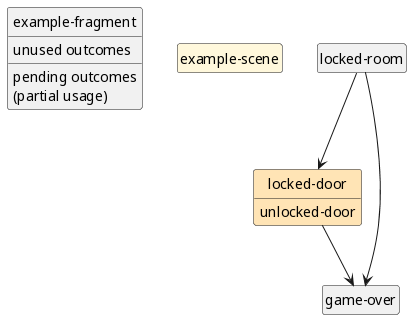
But first: tracking outcomes over multiple fragments requires keeping state and passing it from fragment to fragment.
Adding state
Use define state : game-state-init! to create state, then pass it
along from fragment to fragment.
To pass it along, add the state after the fragment name. It is an
argument of the fragment.
define : into-the-void state
    Ask
      : Move alone into the silent night
        into-the-night state
      : Cower in fear
        Say
            Your adventure ends here

define : into-the-night state
    Enter : Nothing
    Nothing
        Fear dissipates
        reality dissolves
        darkness looms
        in welcoming warmth.

;; create the state
define state : game-state-init!
;; start the game with the created state
into-the-void state
Write this into a file like state.w and call it with
./game.w --run state.w
The state must always be passed along. If a fragment ends without
calling another fragment, it can return the state with . state or by
ending with a call to a fragment that returns the state. The calling
fragment can update its state with set! state new_state.
Ask can return a state, too, by using game-state state. If
you set the state to the one returned from Ask, each answer must
return a state, either by calling a fragment that returns the state or
by calling game-state state in its last line.
To check the state during writing, you can display it (only after
Enter):
define : investigate state
  Enter : Narrator
  ;; display the state (for debugging)
  display state : current-error-port
  ;; add a newline
  newline : current-error-port
  set! state ;; set state to the state returned from Ask
    Ask
      : Trace over the cracks in the table
        trace-the-cracks state ;; returns from fragment
      : Open the drawer
        Narrator
            It’s empty, except for a name
            scribbled into old dust.
            Craigh. Who may that be?
        game-state state
  Narrator
    Suddenly you hear footsteps
    and muttered words.
    Get out!
  . state ;; state returned

define : trace-the-cracks state
  Enter : Narrator
  Narrator
    They run deep in the polished stone
    in the shape of claw-marks from a feral beast,
    but which beast can cut stone?
  . state ;; state returned

;; newly created state is used directly
investigate : game-state-init!
Write this into a file like choose.w and call it with
./game.w --run choose.w
Outcomes are named facts like insulted-the-miller or
restarted-the-generator. You can set them and check later whether
they were set.
Adding outcomes
You can add outcomes to the state, remove them, and check for their presence.
To protect against typos, define them before first use, then you get warnings when you try to run the game with a non-defined outcome.
Use outcomes-add state THE-OUTCOME to add an outcome and
outcomes-contain? state THE-OUTCOME to check whether it is set.
outcomes-add returns the state with outcome added.
With when : outcomes-contain? state THE-OUTCOME you start
an indented block that the game only processes if THE-OUTCOME was added.
The inverse is unless : outcomes-contain? state
THE-OUTCOME: processed only if THE-OUTCOME was not added
Let’s remember whether we’ve seen Craigh:
define-outcome know-the-name-craigh
define : investigate state
  Enter : Narrator
  set! state ;; set state to the state returned from Ask
    Ask
      : Trace over the cracks in the table
        trace-the-cracks state ;; returns from fragment
      : Open the drawer
        Narrator
            It’s empty, except for a name
            Craigh. Who may that be?
        ;; the state with added outcome is returned
        outcomes-add state know-the-name-craigh
  Narrator
    Suddenly you hear footsteps
    and muttered words.

  when : outcomes-contain? state know-the-name-craigh
    Say
      And you hear a name: Craigh.
      From multiple voices.
      Do not let them catch you.

  Say
    Get out!
  . state ;; state returned

define : trace-the-cracks state
  Enter : Narrator
  Narrator
    They run deep in the polished stone
    but which beast can cut stone?
  . state ;; state returned

;; newly created state is used directly
investigate : game-state-init!
Write this into a file like outcome.w and call it with
./game.w --run outcome.w
To remove an outcome, use outcomes-remove state THE-OUTCOME. If the
outcome is not in the state, outcomes-remove does not have an
effect. outcomes-remove returns the state with the outcome removed.
Even if you add an outcome multiple times, remove it once is enough to remove it.
A simplified example with all transitions and checks:
define-outcome left-letter-on-desk
define : leave state
  Enter : Narrator
  Narrator
    You stand at her desk,
    your letter in hand.
  set! state
    Ask
      : Put the letter on the desk?
        outcomes-add state left-letter-on-desk
      : Mutter her name.
        Narrator
            “Rina” -- it wakes old memories,
            but you cannot afford to indulge in them.
        game-state state
  Narrator
    The letter may endanger her.
  cond
    : outcomes-contain? state left-letter-on-desk
      set! state ;; must be indented deeper than preceding line
        Ask
          : Quickly pocket it again
            outcomes-remove state left-letter-on-desk
          : Leave it there
            Narrator
                It lies between inkstains.
                What will it mean to her?
            game-state state
    else ;; none of the previous conditions
      Say
        But she may treasure it
      set! state
        Ask
          : Place it on the desk?
            outcomes-add state left-letter-on-desk
          : Keep it
            game-state state
  Narrator
    You leave silently.
  when : outcomes-contain? state left-letter-on-desk
    Narrator
      A week later you find an answer
      secured by a stone on a ridge.
      Your name on it.
      But empty.
      Except for a drop of blood
      on the rim.

leave : game-state-init!
Write this into a file like addremove.w and call it with
./game.w --run addremove.w
To check for multiple conditions, you can use cond instead. Only the
first matching condition is executed:
define-outcome left-letter-on-desk
define-outcome another-outcome
define-outcome new-outcome
define : leave-using-cond state
  set! state
    outcomes-add state left-letter-on-desk
  cond
    : outcomes-contain? state left-letter-on-desk
      set! state ;; must be indented deeper than preceding line
        Ask
          : Quickly pocket it again
            outcomes-remove state left-letter-on-desk
          : Leave it there
            game-state state ;; no change
    : outcomes-contain? state another-outcome
      set! state
        Ask
          : Do something else?
            outcomes-add state new-outcome
          : No!
            game-state state
    else ;; none of the previous conditions match
      set! state
        Ask
          : Place it on the desk?
            outcomes-add state left-letter-on-desk
          : Keep it
            game-state state

leave-using-cond : game-state-init!
Write this into a file like cond.w and call it with
./game.w --run cond.w
If you misspell a consequence, you get an error when execution reaches its position in the code. But that’s late and would hit your players if you don’t test every code path.
By adding imports to the file itself, you can get an early warning about such errors and fix them before they can hit your players.
A minimal example:
;; the imports
import : enter enter
         enter helpers
;; the code
define-outcome know-the-name-craigh
define : knows-craigh state
  when : outcomes-contain? state know-the-name-craig
    Print
      You know Craigh
knows-craigh : game-state-init!
Write this into a file like typo.w and call it with
guile -L . --language=wisp -x .w typo.w
You then get the warning:
;;; typo.w:6:0: warning: possibly unbound variable `know-the-name-craig'
It shows the file (typo.w) and the line number (6) along with the
warning text.
Currently the line number is sometimes off by a few lines, but it is close and shows you where to start looking.
Analyzing the plot
Outcomes make it easy to react to player decisions. Seeing that their decisions have an effect, that their choice matters (Patall, Cooper, and Robinson, 2008), is one of the major motivations for playing games.
But a story with outcomes can easily balloon in complexity, so most outcomes should be used soon, and ideally merged into a small number of branches.
Therefore Enter Three Witches provides analysis tooling to check visually which outcomes you added but did not (yet) use in a later scene.
We’ll analyze the file outcome.w to see the a plain text version:
enter/analyze.w outcome.w
It shows the plot in fragments, scenes (empty here, because they are discussed later: in section How to continue? Save and load savegames) and outcomes.
(Plot (Fragments investigate trace-the-cracks)
      (Scenes)
      (Outcomes
       (Known know-the-name-craigh)
       (Used (know-the-name-craigh . 1))
       (Unused)))
Let’s see that visually: create a diagram of the plot:
enter/analyze.w --plot-diagram plot.png outcome.w
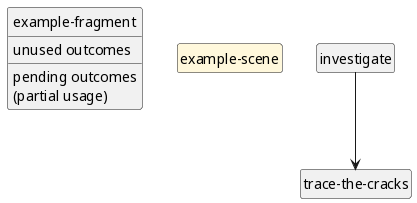
This analysis uses plantuml to render beautiful plot diagrams.
Since in outcome.w all outcomes are used, the diagram shows no
unused or pending outcomes (pending outcomes will be discussed in
section
How to scale up? Split into chapters and use pending outcomes)
To show how the diagram looks with unused outcomes, let’s build the shell of a plot: only use outcomes and leave out the game content.
define-outcome found-key
define-outcome unlocked-door
define-outcome destroyed-door
define-outcome rations-depleted
define : locked-room state
  set! state
    Ask
      : Search the room?
        outcomes-add state found-key
      : Eat your rations?
        outcomes-add state rations-depleted
  Ask
    : Lie down to sleep?
      game-over state
    : Go to the door?
      locked-door state

define : locked-door state
  set! state
    cond
      : outcomes-contain? state found-key
        outcomes-add state unlocked-door
      else
        outcomes-add state destroyed-door
  game-over state

define : game-over state
  when : outcomes-contain? state destroyed-door
    Print
      (Trouble)
  when : outcomes-contain? state rations-depleted
    Print
      (Hunger)
  game-state state

locked-room : game-state-init!
Write this into a file like unused.w and create the diagram:
enter/analyze.w unused.w --plot-diagram unused.png
You can see at a glance that you did not take up the outcome
unlocked-door yet, so you can easily get an overview of all the
outcomes in the plot you did not take care of yet.
The plain text output shows this, too:
enter/analyze.w unused.w
It gives the output
(Plot (Fragments locked-room locked-door game-over)
      (Scenes)
      (Outcomes
       (Known found-key unlocked-door destroyed-door rations-depleted)
       (Used (destroyed-door . 1) (rations-depleted . 1) (found-key . 1))
       (Unused unlocked-door)))
Make sure to use most outcomes in every branch of either the set-piece in which you introduce them or in the one following it. Only carry a small number of outcomes from set-piece to set-piece to keep the complexity of the plot manageable.
A more complex example for a plot diagram is the one from dryads wake (version from 2026-03-22):
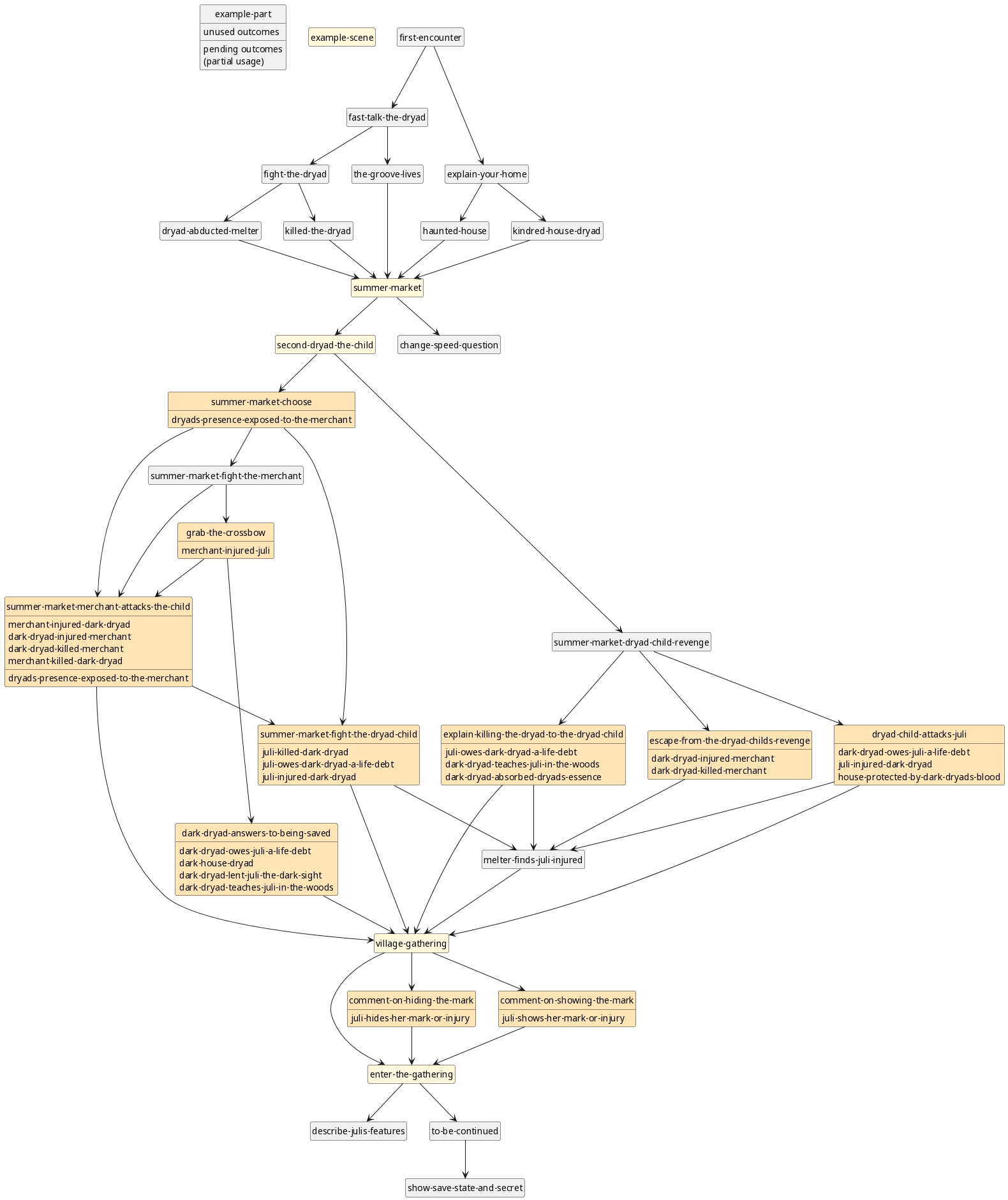
As support for choosing the kinds of choices you want to offer, the publication Kappler and Mellquist, 2022 “Meaningful choices”, specifically section 2.2 Background: Choices gives a practical overview of different classifications in use.
This is just one publication but the references at its end can guide you to more. Scientific publication is a thing of beauty.
How to reach people? Deploy your game
First make your game executable on its own, then either get it to your users to run locally or offer it as website to open in the browser.
Turning game.w into your game
You have a script file like outcome.w. To turn it into a standalone
game, add a module header that matches the filename with an export for
the first fragment, and add the standard imports.
The module header is define-module : FILENAME-WITHOUT-SUFFIX,
followed by indented . #:export : FIRST-FRAGMENT. Mind the .
before #:export.
Remove the call to the first fragment at the end – you’ll add that
fragment call in game.w.
define-module : outcome ;; the filename without suffix
   . #:export : fragment ;; the first fragment

;; standard imports
import : enter enter
         enter helpers

;; … the content …

;; remove this part:
;; investigate : game-state-init!
Aside: if you place outcome.w in a subfolder like chapter/, you
have to add folder+space as prefix to the module name. Example:
define-module : chapter outcome.
The complete outcome.w now looks like this:
define-module : outcome
   . #:export : investigate ;; the first fragment
import : enter enter
         enter helpers

define-outcome know-the-name-craigh
define : investigate state
  Enter : Narrator
  set! state ;; set state to the state returned from Ask
    Ask
      : Trace over the cracks in the table
        trace-the-cracks state ;; returns from fragment
      : Open the drawer
        Narrator
            It’s empty, except for a name
            Craigh. Who may that be?
        ;; the state with added outcome is returned
        outcomes-add state know-the-name-craigh

  Narrator
    Suddenly you hear footsteps and muttered words.
  when : outcomes-contain? state know-the-name-craigh
    Say
      And you hear a name: Craigh. From multiple voices.
  Say
    Get out!
  . state ;; state returned

define : trace-the-cracks state
  Enter : Narrator
  Narrator
    They run deep in the polished stone
    but which beast can cut stone?
  . state ;; state returned
Now import your script in game.w just before main and adapt the fragment main to call your first fragment:
;; … header you can ignore …

;; CHANGE: import your script file
import : outcome

;; CHANGE: adapt main to run your fragment
define : main args
    when : not : final-action? args
         ;; CHANGE: call your first fragment
         investigate : game-state-init!
With these changes, executing ./game.w starts your game on your
machine.
Offering as a website
The way that is easiest for your users is a webservice: they can just open the link to your game in a browser and play it there. You can test this example setup at dryads-wake.1w6.org/enter
Plain webservice
Setup two instances of your game running on a plain Debian server. To
make this guide work for your game, just replace
https://hg.sr.ht/~arnebab/enter by the repository-URL of your game,
replace enter by its folder name, and replace the PORTS by the
ports you want to use.
I’ll show this using the example I use myself: the cheapest virtual server offering I found hosted in the EU: 2€ a month for root access plus the domain I already had.
Prerequisites: ssh to the server with sudo for package installation.
To try this from docker you can use the standard debian image. That’s how I’m testing these instructions without risking to break my server:
docker run -it debian
I’m not using a Dockerfile for the instructions, because when you’re using the cheapest virtual private server (VPS) offerings, your disk space limits are really tight and docker eats space like crazy, so this guide works without docker.
If you don’t have sudo on the server, start by installing it as root.
apt-get update && apt-get install sudo
From here on out you can and should use a regular user, not root. It
needs to be in the sudo group. To get that:
# either create a new user and switch to it
useradd -mG sudo NEW_USER && su - NEW_USER
# or add the sudo group to the existing user and re-login
usermod -aG sudo EXISTING_USER && su - EXISTING_USER
Start by installing guile and the required tooling in debian:
sudo apt-get install guile-3.0-dev \
  mercurial git autoconf automake make texinfo curl nano
Now ensure that the local install path will be found by Guile:
echo export \
  'GUILE_LOAD_PATH=/usr/local/share/guile/site/3.0/' \
  > ~/.bashrc && source ~/.bashrc
Then install guile-fibers:
git clone https://github.com/wingo/fibers && \
  cd fibers && autoreconf -i && ./configure && make && \
  sudo make install && cd -
And install Wisp:
hg clone https://hg.sr.ht/~arnebab/wisp && cd wisp && \
  autoreconf -i && ./configure && make check && \
  sudo make install && cd -
With this, it’s time to install and test your game:
hg clone https://hg.sr.ht/~arnebab/enter && cd enter && \
  autoreconf -i && ./configure && make check && \
  sudo make install && \
  ./game --test && ./game --server && cd -
You should first see the default test scene of your game in commandline mode (you may have to press Enter to continue). Afterwards it should output:
Running on http://localhost:9423
Stop the server by pressing CTRL-c.
Now that you know that your game works, setup a convenience script to
update the game. Edit it for example with nano.
# create folder if needed
mkdir -p ~/.local/bin/
# edit the file:
nano ~/.local/bin/start-or-update-enter.sh
Now enter the following:
#!/usr/bin/env bash
# precompile scheme-code to minimize downtime
export PORTS="9423 9424"
GAME_IS_DOWN=$(for p in $PORTS; do
    curl --connect-timeout 15 http://localhost:$p \
      >/dev/null || echo -n 1;
done)
cd enter && if hg incoming || test -n $GAME_IS_DOWN; then
    hg pull -u
    # pre-compile wisp language stuff
    for i in */*.scm */*/*.scm; do
        echo 'compiling' $i; guile -L . "$i"
    done
    # pre-compile game
    make && timeout 300 ./game --test
    # kill running instances
    # you can doublecheck with pgrep -laf ./game
    pkill -f ./game;
    # leave time for cleanup
    sleep 1;
    # run two instances of your game, detached as daemons
    for p in $PORTS; do
        nohup ./game --server --port $p \
          > /tmp/enter-${p}-$(date --iso).log &
    done
fi
Make the script executable with
chmod +x ~/.local/bin/start-or-update-enter.sh
Now you can start or update two instances of your game running on port
9423 and 9424 from the shell by calling
~/.local/bin/start-or-update-enter.sh.
You may want to log into another path than /tmp, but /tmp usually
works, so this guide uses that.
Now you have a running game. To update it, just push to your repository, then update the game via ssh:
ssh YOUR_SERVER .local/bin/start-or-update-enter.sh
Try it with your web browser of choice.
But this does not provide encryption with SSL, so you really shouldn’t deploy it on the internet today. If you already have an SSL terminator and load balancer, use it.
Otherwise use an nginx setup as explained in the next chapter.
With nginx for SSL and load-balancing
You need the server from the previous setup again. Here we’ll add SSL and load-balancing via nginx. Nginx (“engine-x”) is Free Software under a lax license.
For your game, you’ll again need to replace enter by its folder
name, and to replace the PORTS (9423 and 9424) by the ports you use.
Also replace dryads-wake.example.com by your domain.
For SSL you need a domain. When you go shopping for one, make sure it does automatic renewal. Few things are more aggravating than deploying a mildly successful game and then seeing a domain stealer sweep your domain from your domain registrar and use it for malware. Look into the documentation of your server’s hoster how to link the domain name to your server. For your first try, a free dynamic DNS service like FreeDNS.afraid.org could suffice, but before anyone outside your circle of friends sees your game, you’ll want your own domain name.
First install nginx:
sudo apt-get install nginx certbot python3-certbot-nginx
Now configure an upstream
# edit the file
sudo nano /etc/nginx/sites-enabled/default
You need an upstream and a server config:
# upstream with two services on different ports
upstream enter {
        least_conn;
        server localhost:9423;
        server localhost:9424;
}
# server section
server {
        listen 80 default_server;
        listen [::]:80 default_server;

        server_name dryads-wake.example.com;

        # Adjust read timeout: avoid too early timeout
        # for media files when the backend is overloaded.
        proxy_read_timeout 360s;
        # keep connection when client lost connectivity
        send_timeout 300s;
        # or is so overloaded that the ping stops
        proxy_send_timeout 300s;
        # in overload wait half the read timeout for new clients
        proxy_connect_timeout 180s;

        # use canonical name ending with slash
        location = /enter {
                return 302 /enter/;
        }
        # use load balancing via upstream enter
        location ^~ /enter/ {
                proxy_pass http://enter;
        }

        # legal stuff: logging what DSGVO / GDPR allows
        access_log /var/log/nginx/enter-access.log anonymized;
}
Add the log anonymizer config in /etc/nginx/conf.d/anonymized.conf
(snippet by Mike Bretz on Stackoverflow, license: cc by-sa 3.0):
map $remote_addr $ip_anonym1 {
default 0.0.0;
"~(?P<ip>(\d+)\.(\d+))\.(\d+)\.\d+" $ip;
"~(?P<ip>[^:]+:[^:]+):" $ip;
}

map $remote_addr $ip_anonym2 {
default .0.0;
"~(?P<ip>(\d+)\.(\d+)\.(\d+))\.\d+" .0.0;
"~(?P<ip>[^:]+:[^:]+):" ::;
}

map $ip_anonym1$ip_anonym2 $ip_anon {
default 0.0.0.0;
"~(?P<ip>.*)" $ip;
}

log_format anonymized '$ip_anon - $remote_user [$time_local] '
'"$request" $status $body_bytes_sent '
'"$http_referer" "$http_user_agent"';
Now start nginx and setup SSL with certbot (adapted from the official certbot instructions):
# start nginx if necessary
sudo service nginx start
# run certbot.
# this will fail if you did not change the domain,
# because example.com is defined as non-existent.
sudo certbot --nginx
# setup automatic renewal twice a day:
echo "0 0,12 * * * root sudo certbot renew -q" | \
  sudo tee -a /etc/crontab > /dev/null
Now you have your own game running in the internet that you can point your friends to. Presently (2026) the weakest server you can find (single core) should be able to sustain about 300 simultaneous players.
An alternative to nginx with parity of relevant features would be HAProxy. There are others, but I don’t know the state of Apache as reverse proxy and I’m not mentioning servers that do not have a Guix package (couldn’t test them well), though I’d be happy to link setup instructions.
Enabling execution on the command line
To provide users with a download they can keep, you can deploy it as file. It enables them to run your game on GNU Linux systems via the command line.
There are three main options:
- Create an archive file. Smallest and easiest to host, but most complex for users.
- Create a repository with history. Larger and more complex to host, skips one step for users.
- Create an appImage. Much larger, but users can simply run it as program (on GNU/Linux).
Publishing an unversioned archive file
For the simplest option, just commit your changes into the repository you cloned and create an unversioned archive file to share.
hg add outcome.w
hg conf -el # open the local repository config file
# add (without the # prefix):
#[ui]
#username = your name <email@example.com>
hg commit -m "First version" # save snapshot
hg archive your-game.tgz
Then you can upload that archive on any hoster like itch.io (i.e. for a game jam), a patreon page, or simply your own website.
People can then play your game by installing Guile, extracting the
archive, and running ./game.w inside it.
This uses tgz instead of zip, because zips lose the info that
game.w can be executed, so users would have to run bash game.w.
Publishing a repository
To share your game with history, create a repository on a Mercurial code hoster and push there.
With the outcome.w file you’ll use:
hg add outcome.w
hg conf -el # open the local repository config file
# add (without the # prefix):
#[ui]
#username = your name <email@example.com>
#[paths]
#default = ssh://hg@hg.example.com/path-to/enter
hg commit -m "First version" # save snapshot
hg push
Now give others the repository you pushed to. They can clone your game with:
hg clone https://hg.example.com/path-to/enter
You can (and should) already commit early and often before publishing the repository, but it is only required when you publish.
Publishing an appImage with Guix
To create an appImage, you need a Guix system that provides all dependencies and can bind them into the appImage.
If you do not run Guix, you can use Docker. This section explains creating the appimage directly from Guix:
cd path-to/enter && \
  guix shell --pure mercurial guix \
    -f guix.scm -D -f guix.scm -- \
    bash -c 'autoreconf -i && ./configure && \
      make -B && make distcheck && make game.appimage'
Now you can run your game via ./game.appimage. You can then rename
it at will.
To try it, download an example: www.draketo.de/software/enter-three-witches.appimage
You can run it on GNU/Linux with
chmod +x enter-three-witches.appimage && \
  ./enter-three-witches.appimage
This is a complete standalone version of your game, including all
dependencies down to the system libraries – except for the optional
mpv and catimg which add audio and image support on the terminal.
Publishing an appImage with Docker
To generate an appimage without running Guix yourself, you can use
the docker image metacall/guix (get the source):
cd path-to/enter && \
  docker run --rm --privileged --network=host \
    --entrypoint bash -v "$(realpath .)":/enter -it \
    metacall/guix -c \
    "/entry-point.sh guix shell --pure mercurial guix \
      -f /enter/guix.scm -D -f /enter/guix.scm -- \
      bash -x -c 'cd /enter && autoreconf -i && \
        ./configure && make -B && make distcheck && \
        make game.appimage'"
When built via docker, the image may be more limited in accessing
programs on the system (like mpv and catimg for sound and images
on the command line), so you might not see those.
Try it: www.draketo.de/software/enter-three-witches–docker.appimage
chmod +x enter-three-witches--docker.appimage && \
  ./enter-three-witches--docker.appimage
TODO How to continue? Save and load checkpoints
Creating savegames with name and secret
To enable people to play your story in smaller parts and take breaks in between, or to make it easy to release a story in episodes, you need savegames.
Saving a game and loading it later needs a name to identify the state. On websites, it also requires a secret to prevent others from taking over another players’ game.
To realize this, savegames contain a name, a secret, and the
fragment where the game starts again when the player loads it. When
loading a saved game, the player must either input name and secret
(when running on a webserver) or select the name (when running in
the terminal).
To create and load games with saved states, you can use
create-new-game and load-saved-game.
create-new-game takes a (new) state, a starting fragment, and a
fragment used to show the save state and secret.
The prepared chapter/00-menu.w uses create-new-game to build a game-specifc new-game fragment:
define : show-save-state-and-secret state
    . "Helper fragment to inform the player how to load the game later."
    Enter : Old One :profile narrator
    if running-as-webserver
        Old One
            ,(faster) Your save state name is ,(game-state-id state)
            with the secret ,(game-state-secret state)
            Please write down both to load later. ,(ask-continue) ,(slower)

        Old One
            Your save state name is ,(game-state-id state)

define : new-game state
    create-new-game state first-encounter show-save-state-and-secret
    ;; do not return the state
    . #f
To adjust new-game for your game, customize
show-save-state-and-secret to match the style of your game and
replace first-encounter with your starting fragment.
load-saved-game takes a game initialization fragment, a fallback
fragment (to use if none is saved) and a resolver to load a saved
fragment.
The prepared chapter/00-menu.w uses load-saved-game to create
load-game that asks the player to select a save state and starts in
its last saved fragment:
define : game-init
    . "Initialize a game into which to load a savestate"
    new-game : game-state

define : resolve name
  . "Resolve a name to a runnable fragment to continue from."
  module-ref (resolve-module '(game)) name

define : load-game
    . "Ask the player to select a game state"
    load-saved-game game-init first-encounter resolve
Now that you can create and load savegames, the next step is saving the state. The easiest option for that are savepoints.
TODO Defining scenes as savepoints
(define fragments that automatically get saved as step to continue
from by using define-scene instead of with define)
define-scene : savepoint-fragment state
  Enter : The Narrator
  The Narrator

  next-fragment state
TODO Where can I go? Rules and code beyond storytelling
TODO Adding skills and rules
Character skills are values attached to names of people. They come with a ruleset which allows checking whether some action succeeds, and they can improve with usage or by increasing them manually.
TODO Adding battle and wounds
(long-term consequences, …)
TODO Executing arbitrary code
(…, always validate and cleanup all user-input meticuloulsy before using it for anything)
In the commandline-version
(just call Scheme functions and return results to output as string, #f for no output)
In the webbrowser
(write Javascript interface matched by game logic functions)
TODO How to scale up? Split into chapters and pending outcomes
TODO Splitting your game into chapter-files
(multiple files in chapters, each use define-module, each import the
outcomes and fragments from the chapters they use)
TODO Using outcomes-contain/pending? to resolve outcomes incrementally
(use outcomes-contain/pending? to check for outcomes but keep them
visible in the plot diagram until you checked them in all branches of
the plot)
TODO How to …? Common solutions (FAQ)
TODO Translating a game
Creating a good translation of a book is almost like writing that book again. Consequently Enter Three Witches also puts translators at the helm: copy the files with the game and translate the file as one consistent text.
You can re-use all the assets and logic from the source language, but what you write aren’t disconnected internationalization strings, and if the translated story needs some detour (e.g. because some figure of speech does not work there) or some lines just don’t work at all, you can add or remove lines and adapt the context to keep the game working nonetheless.
In practice: if you use a chapter-structure, create a subfolder for
the translated scenes and also prefix the scene names used in
savegames (defined with define-scene) with the language code.
Then go and translate them as if you were writing a new game.
You can then add a language selection in the menu that just calls the entry point fragment from the chosen language. But the language can’t be switched mid-game.
TODO Updating Enter Three Witches in your game
(simply do hg pull && hg merge)
TODO Troubleshooting errors
“source expression failed to match any pattern in form define-module”
Usually this means a speaker was used who did not Enter. Check
whether there’s a spelling error in a name.
Who uses it? Games built with Enter Three Witches
- Dryads Wake – nature awakes in a fantasy world (in progress)
- Dryads Sun – rebuild lost memories in a solar tower (in progress)
- Terra’s Heritage – protect a scientifc conference (in progress)
TODO How does it compare? Interactive fiction and game engines
There is already a wealth of interactive fiction authoring tools (via ifwiki.org).
(why another?, compare, also compare to game engines, only check FLOSS, commercially published games? Multimedia? Editing support?)
TODO Where next? Future plans for Enter Three Witches
(accessible graphics and sound for the Web-Version, setup for somewhat safe access via telnet, Deployment to Linux distros, Graphical Chickadee-Game, integration with ifarchive https://babel.ifarchive.org/babel.html, integration in arcade or strategy games, dialogue snippets for ingame banter in world exploration RPG levels, …)
TODO Who are you? Can I prove my claims?
(DrArneBab, PhD, reference the talk Natural Script Writing with Guile again, also reference the 2016 talk, and a previous try — TextRPG — but say clearly that I don’t have industry experience with large-scale games, so the future will show how well this works out on the long run. But at the current state I’m confident enough in the design that I dare to recommend it to others, which is why I now wrote this tutorial. That’s also why along with this tutorial I’m releasing version 1.0 of Enter Three Witches. I consider it as stable now, so future changes should preserve backwards compatibility.)
TODO Summary
Parting Notes: Background and Motivation
Some notes that do not fit into the flow of the general article.
At FOSDEM 2016 I gave a talk about wisp, presenting theater scripts as a usecase. A 2017 followup presentation showed the first well-working version of Enter Three Witches. This article is a second followup after 10 years with Enter Three Witches, showing how to use it for your own games, both on the commandline and on the web.
That’s where it started. Though it misses one essential motivation I have to work on it: I realized that the difference between plotting in Starcraft 1 and Starcraft 2 is that in SC1 they could tinker with the story to the very end and in SC2 their high-quality plot-videos restricted the writers from doing last minute changes.
And I think the part of the game that will be most polished in the end is the one that can be edited at any time. That’s why enter-three-witches strictly drives the game from the story and dialogues.
If you decide to port it, also have a look at the outcomes system: https://hg.sr.ht/~arnebab/dryads-wake/browse/game-helpers.w?rev=tip#L171
That allows me to analyze branching plots with a simple code walker: https://hg.sr.ht/~arnebab/dryads-wake/browse/analyze-plot.w?rev=tip#L43
It generates plot diagrams.
That shows a scene-graph and lists the outcomes I did not yet check against, so I can be sure that player choice matters, because I include a consequence for every decision players take.
Translations are by the way the biggest hurdle with the enter-three-witches syntax. There’s no good way to translate that with gettext or such. The best bet would be to treat the text as actual prose and translate it in one go.
But I actually think that that’s what should be done for game plot text, because it is (and should be) complex prose and not some menu elements that can be re-translated in isolation when it changes.
The syntax for Enter is about the deepest dive I took into macros. The
Enter macro generates new macros for the introduced people and those
macros quasiquote their arguments and then process them word by word:
each word is split into letters and printed with some delay and
commands like ,(something) are executed once the word gets
processed. So they can also be used to play sound effects or trigger
graphic effects exactly when some word is spoken.
, in text is handled by either putting it at the end of words (where it
works) or by escaping it as ., – same for period (.. ⇒ .). Those
are sometimes needed when you want to unset color with ,(color #f)
and then add a final period.
Footnotes:
Put in academic wording, it’s an EDSL: an embedded domain specific language.