Naming and Logic
programming essentials with Wisp
This article teaches the core of programming with Wisp. You learn the simplicity and power of Lisp with fewer parentheses. The tutorial starts from scratch and teaches in examples with minimal explanation. Its core is a map of the essential functionality you need to write meaningful programs.
📚 If you want to support me, please
📚 buy the pocket-format print-version from epubli, or
📚 from your local book shop via ISBN: 978-3-565-09319-9.
To follow along, install Wisp and try the examples as you read.
I hope that one day this web version will be interactive, using Guile on wasm (which is currently being built by the folks at Spritely).
This is Free Culture (cc by-sa and LGPLv3+).
The source is programming-basics-wisp.org
Expressions of Gratitude: Thank you to Riviera and holothuroid for testing, and my proofreaders for finding the worst errors (thank you for braving the original text!), and the Scheme developers for accepting Wisp more easily than I expected, and the Emacs and Org-Mode developers for the tool which enables my writing, and the multigenerational Community of Guile developers for this great software, and the GNU project for being the core that keeps computing free.
Preface
Why this book? To provide a concise start, a no-frills, opinionated
intro to programming from first define to deploying an application
on just 64 short pages.
Who is it for? You are a newcomer and want to learn by trying code examples? You know programming and want a running start into Scheme? You want to see how little suffices with Scheme’s practical minimalism? Then this book is for you.
What is Wisp? Wisp is the simplest possible indentation based syntax which is able to express all possibilities of Lisp. It is included in Guile Scheme, the official extension language of the GNU project.
»Wisp allows people to see code how Lispers perceive it.
Its structure becomes apparent.« — Ricardo Wurmus, 2019
How to get Wisp? Download and install Wisp from the website
www.draketo.de/software/wisp — then open the REPL by executing
wisp in the terminal. The REPL is where you type and try code
interactively. Or install Guile 3.0.10+ and run guile
--language=wisp or guile3.0 --language=wisp. This text assumes GNU
Linux.
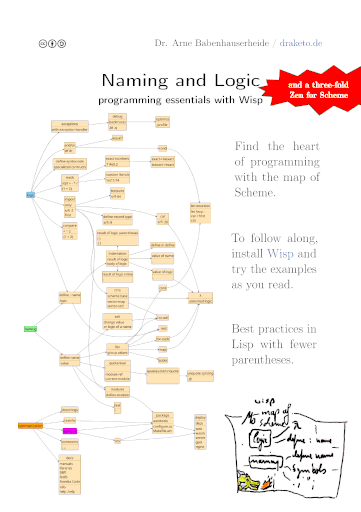
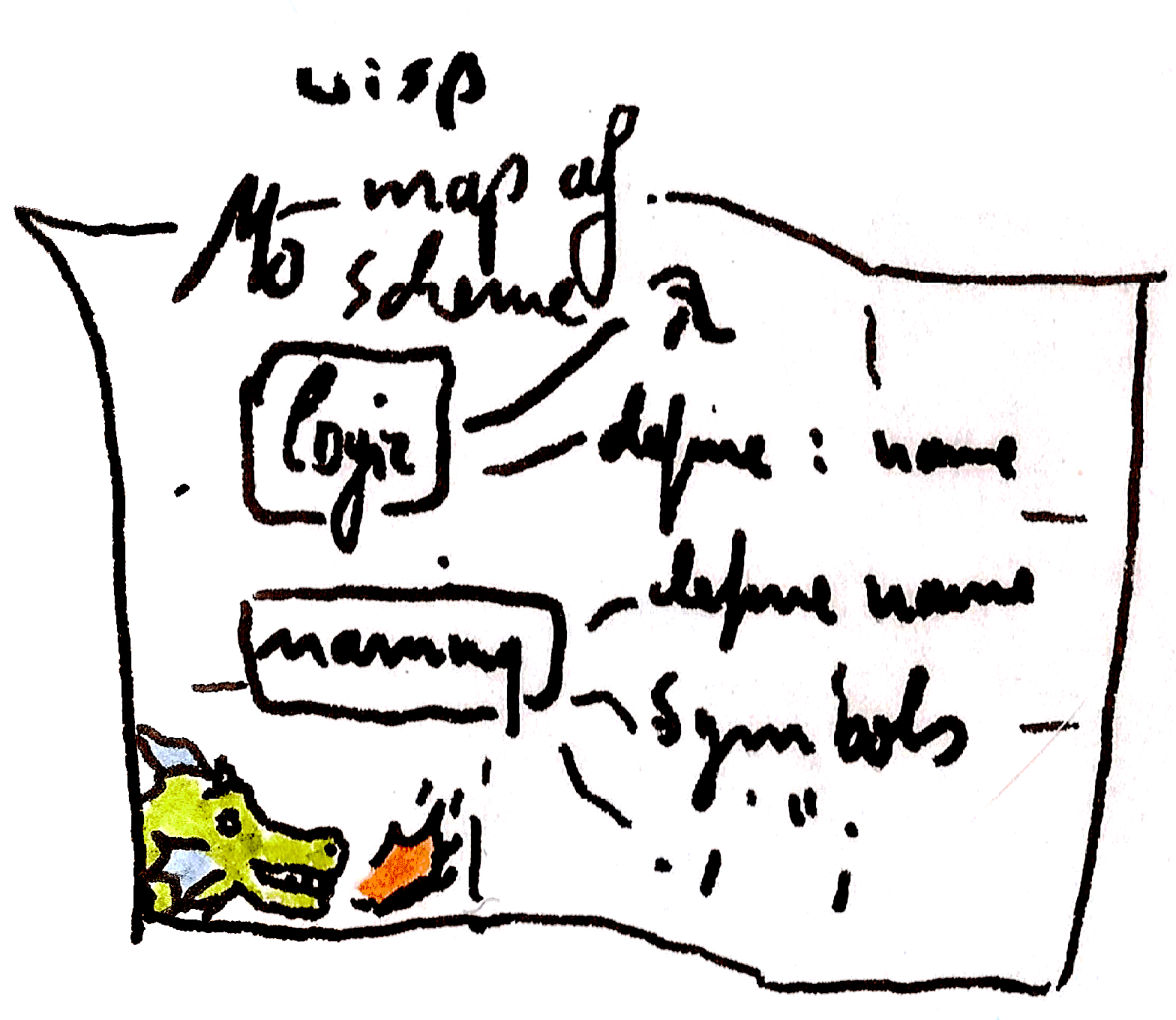
The Map of Scheme
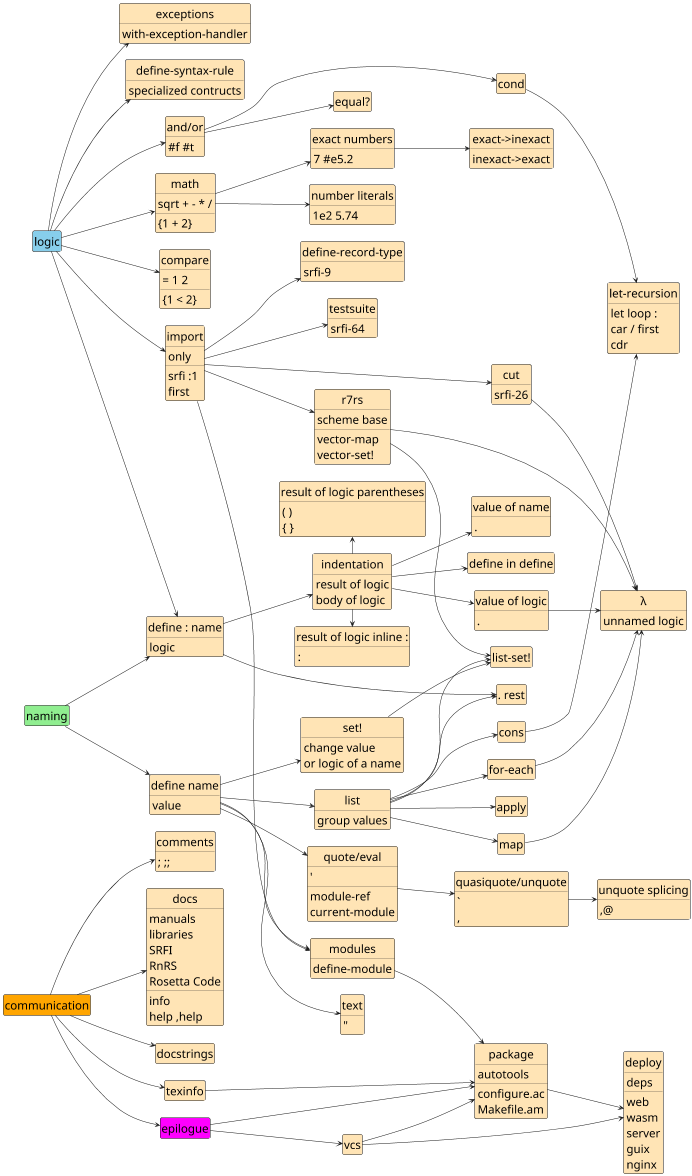
(How to make such a map? See Org Mode Tipp: imagemap)
Name a value with define
Use define to name a value. Use . to return a value.
define small-tree-height-meters 3
define large-tree-height-meters 5
. small-tree-height-meters
After typing code in the REPL, hit enter three times. It returns:
$1 = 3
This means: the first returned value ($1) is 3. The next time you
return a value, it will be called $2.
Names can contain any letter except for (white-)space, quote, comma or parentheses. They must not be numbers.
define illegal name 1
define 'illegal-name 2
define ,illegal-name 3
define illegal)name 4
define 1113841 5
Add comments with ;
define birch-height/m 3
;; this is a comment
define height ;; comment at the end
  ;; comment between lines
  . 5 ; return the value to define
It is common to use ;; instead of ;, but not required.
A comment goes from the first ; to the end of the line.
Compare numbers
= 3 5
$1 = #f
= 3 3
$1 = #t
Logic returns its result without needing a period (.).
#t means true, #f means false.
The logic comes first. This is clear for =, but easy to misread for <.
< 3 5 ;; is 3 smaller than 5? #true
< 5 3 ;; is 5 smaller than 3? #false
> 3 5 ;; is 3 bigger than 5? #false
> 5 3 ;; is 5 bigger than 3? #true

> 3 3 ;; is 3 bigger than 3? #false
>= 3 3 ;; is 3 bigger than or equal to 3? #true
<= 3 3 ;; is 3 smaller than or equal to 3? #true
$1 = #t
$2 = #f
$3 = #f
$4 = #t
$5 = #f
$6 = #t
$7 = #t
Use infix in logic
. {3 = 5}
. {3 < 5}
. {3 > 5}
$1 = #f
$2 = #t
$3 = #f
Infix logic gives a value, so you need . to return it.
You can only use curly braces for infix operations.
Because infix-logic gives a value, you can use infix-logic in place of a value, for example to nest it:
. {{5 < 3} equal? #f}
$1 = #t
Or to name it as value:
define is-math-sane? {3 < 5}
. is-math-sane?
$1 = #t
By convention, names that have the value true or false have the suffix ?.
Use logic with true and false
and #t #t
and #f #t
or #f #t
or #f #f
$1 = #t
$2 = #f
$3 = #t
$4 = #f
If any value passed to and is #f (#false), it ignores further values.
If any value passed to or is not #f (not #false), it ignores further values.
and #t #t #t ;; => #true
and #t #f #t ;; => #false
and {3 < 5} {5 < 3} ;; => #false
or #t #f #t ;; => #true
or {3 < 5} {5 < 3} ;; => #true
or #f #f #f ;; => #false
$1 = #t
$2 = #f
$3 = #f
$4 = #t
$5 = #t
$6 = #f
For and and or, everything is #true (#t) except for #false (#f).
Given the number of hard to trace errors in other languages that turn
up in production, this is the only sane policy.
Use named values in logic
define small-tree-height/m 3
define large-tree-height/m 5
. {small-tree-height/m < large-tree-height/m}
$1 = #t
Name the result of logic with indentation
define birch-h/m 3
define chestnut-h/m 5
define same-height?
  = birch-h/m chestnut-h/m
define smaller?
  . {birch-h/m < chestnut-h/m} ;; infix
. smaller?
$1 = #t
The more indented line returns its value to the previous, less indented line.
The infix gives a value, so it needs the . as prefix to
return the value.
Name logic with define :
define : same-height? tree-height-a tree-height-b
  = tree-height-a tree-height-b
same-height? 3 3
;; also works with infix
. {3 same-height? 3}
$1 = #t
$2 = #t
By convention, logic that returns true or false has the suffix ?.
You can use your own named logic like all other logic. Even with
infix.
What this map of Scheme calls named logic is commonly called
function or procedure. We’ll mostly stick with logic for the
sake of a leaner conceptual mapping.
The first word is the name of the logic. The others are the arguments the logic operates on. The indented lines with the logic named here are called the body. The body of named logic can have multiple lines. Only the value of the last is returned.
define : unused-comp value
  = 2 value ;; not returned
  = 3 value ;; returned
unused-comp 2
unused-comp 3
$1 = #f
$2 = #t
Name a name using define with .
define small-tree-height-meters 3
define height
  . small-tree-height-meters
. height
$1 = 3
After you name a name, the new name holds the same value as the original name.
. returns the value of its line.
Return the value of logic with .
define : larger-than-4? size
  . {size > 4}
. larger-than-4?
$1 = #<procedure larger-than-4? (size)>
The value of logic defined with define : is a procedure — often
called proc for brevity. You can see the arguments in the output: If
you call it with too few or too many arguments, you get errors.
There are other kinds of logic: syntax rules and reader-macros. We
will cover syntax rules later. New reader macros are rarely needed;
using {...} for infix math is a reader macro.
Name inside define : with define
define birch-h/m 3
define : birch-is-small
  define reference-h/m 4
  . { birch-h/m < reference-h/m }
birch-is-small
$1 = #t
Only the last part of the body of define : is returned.
Note the . in front of the { birch-h/m < reference-h/m }: a
calculation inside braces is executed in-place. It is its result, so
its value needs to be returned.
A Zen for Scheme part 1: Birds Eye
- RR
- Remove limitations to Reduce the feature-count you need,
but OM: Optimizability Matters. - FI
- Freedom for Implementations and from Implementations,
but CM: Community Matters: Join the one you choose. - SL
- Mind the Small systems!
And the Large systems! - ES
- Errors should never pass silently,
unless speed is set higher than safety.
Thanks for the error-handling principle goes to John Cowan.
Name the result of logic in one line with : or ()
define birch-h/m 3
define chestnut-h/m 5

define same-height? : = birch-h/m chestnut-h/m
. same-height?
define same-height-again? (= birch-h/m chestnut-h/m)
. same-height-again?
$1 = #f
$2 = #f
This is consistent with infix-math and uniform with defining logic:
define birch-h/m 3
define chestnut-h/m 5

define same-height? {birch-h/m = chestnut-h/m}
. same-height?
;; define logic
define : same? tree-height-a tree-height-b
  = tree-height-a tree-height-b
;; using the defined logic looks like defining it
define same2? : same? birch-h/m chestnut-h/m
. same2?
$1 = #f
$2 = #f
Name text with "
define tree-description "large tree"
define footer "In Love

Arne"
define greeting
  . "Hello"
display footer
In Love

Arne
Like { }, text (called string as in “string of characters”) is its
value.
Text can span multiple lines. Line breaks in text do not affect the meaning of code.
You can use \n to add a line break within text without having a
visual line break. The backslash (\) is the escape character and
\n represents a line break. To type a real \ within quotes ( "
), you must escape it as \\.
Text is stronger than comments:
define with-comment ;; belongs to coment
  ;; comment
  . "Hello ;; part of the text"
. with-comment
$1 = "Hello ;; part of the text"
Return the value with . to name text
on its own line.
With display you can show text as it will look in an editor.
Take decisions with cond
define chestnut-h/m 5
define tree-description
  cond
    {chestnut-h/m > 4} ;; condition
      . "large tree"   ;; result
    : = 4 chestnut-h/m ;; check returned value
      . "four meter tree"
    else
      . "small tree"
. tree-description
$1 = "large tree"
cond checks its clauses one by one and uses the first with value
#true. To cond every valid value is #true (#t) except for
#false (#f).
cond
  5
    . #t
  else ;; else is #true in cond
    . #f
cond
  #f #f   ;; can put the value directly
  else #t ;; on the same line, if not using :
$1 = #t
$2 = #t
To use named logic, prefix it with : or enclose it
in parentheses () for prefix or braces {} for infix to check its value.
: needs a line-break after the condition.
Use fine-grained numbers with number-literals
define more-precise-height 5.32517
define 100-meters 1e2 ;; 1 times 10 to the power of 2
. more-precise-height
. 100-meters
$1 = 5.32517
$2 = 100.0
These are floating point numbers. They store approximate values in 64 bit binary, depending on the platform. Read the details in the Guile Reference manual section Real and Rational Numbers, the r5rs numbers, and IEEE 754.
Use exact numbers with #e and quotients
define exactly-1/5 #e0.2
define exactly-1/5-too 1/5
. exactly-1/5
. exactly-1/5-too
$1 = 1/5
$2 = 1/5
Guile computations with exact numbers stay reasonably fast even for unreasonably large or small numbers.
Turn exact numbers into decimals with exact->inexact
exact->inexact #e0.2
exact->inexact 1/5
exact->inexact -2e7
$1 = 0.2
$2 = 0.2
$3 = -2.0e7
The inverse is inexact->exact:
inexact->exact 0.5
$1 = 1/2
Note that a regular 0.2 need not be exactly 1/5, because floating
point numbers do not have an exact representation for that. You’ll
need #e to have precise 0.2.
inexact->exact 0.2
. #e0.2
$1 = 3602879701896397/18014398509481984
$2 = 1/5
Use math with the usual operators as logic
define one-hundred
  * 10 10 ;; multiply with *
define half-hundred : / one-hundred 2 ;; divide with /
. half-hundred
$1 = 50
Remember that names cannot be valid numbers!
define 100 ;; error!
  + 90 10
While compiling expression:
Syntax error:
unknown location: source expression failed to match any pattern in form (define 100 (+ 90 10))
Using infix via curly braces {} is useful for math:
define one-hundred {10 * 10}
define half-hundred {one-hundred / 2}
. half-hundred ;; tallest northern red oak
$1 = 50
Return a list of values with list
list 3 5
define known-heights
  list 3 3.75 5 100
. known-heights
$1 = (3 5)
$2 = (3 3.75 5 100)
You can put values on their own lines by returning their value:
. returns all the values in its line. Different from define :,
list keeps all values, not just the last.
define known-heights-2
  list 3
     . 3.75 5
     . 100
define known-heights-3
  list
    . 3
    . 3.75
    . 5
    . 100
define : last-height
  . 3 3.75 5 100 ;; only the last (100) is returned
= 100 : last-height
. known-heights-3
$1 = #t
$2 = (3 3.75 5 100)
Import pre-defined named logic and values with import
import : ice-9 pretty-print
         srfi :1 lists ;; no space after the :

pretty-print ;; format a structure nicely
  list 12 : list 34
    . 5 6
first : list 1 2 3 ;; 1
second : list 1 2 3 ;; 2
third : list 1 2 3 ;; 3
member 2 : list 1 2 3 ;; includes 2 => 2 3 => #true
(12 (34) 5 6)
$1 = 1
$2 = 2
$3 = 3
$4 = (2 3)
Import uses modules which can have multiple components. In the first
import, ice-9 is one component and the second is pretty-print. In
the second, srfi is the first component, :1 is the second, and
lists is the third.
ice-9 is the name for the core extensions of Guile. It’s a play on ice-nine, a fictional perfect seed crystal.
SRFI’s are Scheme Requests For Implementation, portable libraries
built in collaboration between different Scheme implementations. The
ones available in Guile can be found in the SRFI chapter of the
Guile Reference Manual. More can be found on srfi.schemers.org. They are
imported by number (:1) and can have a third component with a name,
but that’s not required.
You can use only to import only specific names.
import : only (srfi :1) first ;; no second

first : list 1 2 3 ;; 1
second : list 1 2 3 ;; error
$1 = 1
ice-9/boot-9.scm:1677:22: In procedure raise-exception:
Unbound variable: second

Entering a new prompt.  Type `,bt' for a backtrace or `,q' to continue.
Optimize for performance with ,profile
When in the interactive REPL, you can get a runtime profile. Fast operations may need to be run in a loop to get a robust sample:
define runs : iota 1000000 ;; numbers from 0 to 999999
,profile for-each number->string runs
%     cumulative   self
time   seconds     seconds  procedure
 50.00      0.13      0.07  ice-9/boot-9.scm:260:2:for-each
 50.00      0.07      0.07  number->string
---
Sample count: 4
Total time: 0.132540664 seconds (0.111396361 seconds in GC)
To look deeper, use ,disassemble.
In code files import : statprof.

Get the result of logic inline with parentheses (), braces {}, or colon :
list 1 2 (+ 1 2) 4
list 1 2 {1 + 2} 4
list 1 2 : + 1 2
   . 4 ;; use . to continue the arguments after :
$1 = (1 2 3 4)
$2 = (1 2 3 4)
$3 = (1 2 3 4)
Line breaks and indentation are ignored inside parentheses, except for
the value of text (strings).
The operators that need linebreaks are disabled inside parentheses:
colon : and period . neither get the value nor return it, but the
last value is returned implicitly. This is the default in regular
Scheme.
: needs linebreaks, because it only goes to the end of the line.
. needs linebreaks, because it only applies at the beginning of the
line (after indentation).
A Zen for Scheme part 2: On the Ground
- HA
- Hygiene reduces Anxiety,
except where it blocks your path. - PP
- Practicality beats Purity,
except where it leads into a dead end. - 3P
- 3 Pillars of improvement:
Experimentation, Implementation, Standardization.
Compare structural values with equal?
define known-heights
  list 3 3.75 5 100
define known-heights-2
  list 3 3.75 5
     . 100
define known-heights-3
  list
    . 3 3.75
    . 5 100
= 3 3 3
equal? known-heights known-heights-2 known-heights-3
$1 = #t
$2 = #t
equal? compares whether all values it receives are equal. For
structural values like lists, being equal means that all contained
elements have equal value and are in the same order.
Like = and +, equal? can be used on arbitrary numbers of values.
Apply logic to a list of values with apply
apply = : list 3 3
equal?
  = 3 3
  apply =
    list 3 3
$1 = #t
$2 = #t
Only the last argument of apply is treated as list, so you can give initial arguments:
define a 1
define b 1
apply = a b
  list 1 1 ;; the same as = 1 1 1 1
$1 = #t
Using apply proc a (list b c) has the same result as calling proc
with the arguments a b c:
define : proc x y z
    < x y z
apply proc 1 : list 2 3
proc 1 2 3
$1 = #t
$2 = #t
Get the arguments of named logic as list with . rest
define : same? heights
  apply = heights
same? : list 1 1 1 ;; needs a list to use apply
same?
  list 1 1 1
define : same2? . heights
  apply = heights
same2? 1 1 1 ;; takes values directly
same2?
  . 1 1 1
$1 = #t
$2 = #t
$3 = #t
$4 = #t
These are called rest. Getting them is not for efficiency: the list
creation is implicit. You can mix regular arguments and rest
arguments:
define : same? alice bob . rest
  display : list alice bob rest
  newline
  apply = alice bob rest
same? 1 1 1 1 ;; 4 arguments, the last 2 are rest
(1 1 (1 1))
$1 = #t
Remember that apply uses only the last of its arguments as list, in
symmetry with . rest.
Change the value or logic of a defined name with set!
define birch-h/m 3
set! birch-h/m 3.74
. birch-h/m
set! birch-h/m =
. birch-h/m
$1 = 3.74
$2 = #<procedure = (#:optional _ _ . _)>
It is common to suffix logic with ! if it changes values of names.
Since logic can cause changes to names and not just return a result,
it is not called function, but procedure; proc for brevity.
Apply logic to each value in lists and ignoring the results with for-each
define birch-h/m 3
define includes-birch-height #f
define : set-true-if-birch-height! height/m
  cond
    {birch-h/m = height/m}
      set! includes-birch-height #t
define heights : list 3 3.75 5 100
for-each set-true-if-birch-height! heights
. includes-birch-height
$1 = #t
Get the result of applying logic to each value in lists with map
define birch-h/m 3
define : same-height-as-birch? height/m
  = birch-h/m height/m
define heights : list 3 3.75 5 100
. heights
map same-height-as-birch?
  . heights
map +
  list 1 2 3
  list 3 2 1
map list
  list 1 2 3
  list 3 2 1
$1 = (3 3.75 5 100)
$2 = (#t #f #f #f)
$3 = (4 4 4)
$4 = ((1 3) (2 2) (3 1))
When operating on multiple lists, map takes one argument from each
list. All lists must be the same length. To remember: apply
extracts the values from its last argument, map extracts one value
from each argument after the first. apply map list ... flips
colums and rows:
apply map list
  list : list 1 2 3
         list 3 2 1
$1 = ((1 3) (2 2) (3 1))
Create nameless logic with lambda
define : is-same-height? a b
  > a b ;; <- this is a mistake
. is-same-height?
is-same-height? 3 3
define : fixed a b
  = a b
set! is-same-height? fixed
. is-same-height? ;; but now called "fixed" in output!
is-same-height? 3 3
;; shorter and avoiding name pollution and confusion.
set! is-same-height?
  lambda : a b
    = a b ;; must be on a new line
          ;; to not be part of the arguments.
;; since lambda has no name, we see the original again
. is-same-height?
is-same-height? 3 3
$1 = #<procedure is-same-height? (a b)>
$2 = #f
$3 = #<procedure fixed (a b)>
$4 = #t
$5 = #<procedure is-same-height? (a b)>
$6 = #t
The return value of lambda is logic (a procedure).
If logic is defined via define :, it knows the name it has been
defined as. With lambda, it does not know the name.
lambda is a special form. Think of it as define : name arguments,
but without the name.
Reuse your logic with let-recursion
Remember the for-each example:
define includes-birch-height #f
define heights : list 3 3.75 5 100
define : set-true-if-birch-height! height/m
  define birch-h/m 3
  cond
    {birch-h/m = height/m}
      set! includes-birch-height #t
for-each set-true-if-birch-height! heights
. includes-birch-height
$1 = #t
Instead of for-each, we can build our own iteration:
define heights : list 3 3.75 5 100
define : includes-birch-height? heights
  define birch-h/m 3
  let loop : : heights heights
    cond
      (null? heights) #f ;; done: not found
      : = birch-h/m : car heights ;; car is first
        . #t ;; done: one found
      else
        loop : cdr heights ;; drop the first, try again
includes-birch-height? heights
$1 = #t
null? asks whether the list is empty. car gets the first element
of a list, cdr gets the list without its first element.
Recursion is usually easier to debug (all variable elements are available at the top of the let recursion) and often creates cleaner APIs than iteration, because fewer names are visible from outside.
As rule of thumb: start with the recursion end condition (here:
(null? heights)) and ensure that each branch of the cond either
ends recursion by returning something (here #f or #t) or moves a
step towards finishing (usually with cdr, +, -, 1+, or 1-).
Another example in which recursion wins:
define : fib n
   let rek : (i 0) (u 1) (v 1)
        if : >= i {n - 2}
           . v
           rek {i + 1} v {u + v}
A Zen for Scheme part 3: Submerged in Code
- WM
- Use the Weakest Method that gets the job done,
but know the stronger methods to employ them as needed. - RW
- Recursion Wins,
except where a loop-macro is clearer. - RM
- Readability matters,
and nesting works.
Extend a list with cons
The core of composing elementwise operations.
To build your own map function, you need to add to a list. cons on
a list adds to the front (cons on other values creates a pair).
cons 1 : list 2 3 ;; => list 1 2 3
cons 1 2          ;; => (1 . 2) - also see pair? and assoc
$1 = (1 2 3)
$2 = (1 . 2)
Used for a simplified map implementation that takes a single list:
import : only (srfi :1) first
define : single-map proc elements
  let loop : (changed (list)) (elements elements)
    cond
      : null? elements
        reverse changed ;; restore the order
      else
        loop
          ;; add processed first element to changed
          cons : proc : first elements ;; add processed
               . changed               ;; to changed
          cdr elements ;; drop first element from elements
single-map even? : list 1 2 3
$1 = (#f #t #f)
Repeatedly cons’ing the first element of a list onto a second list and dropping it from the first reverses the element order. It’s a core operation, because it’s the most efficient operation for Scheme’s lists.
Mutate partially shared state with list-set!
The elements in a list are linked from its start. Different lists can share the same tail when you cons onto the same partial list.
define tail ;; the shared tail
  list 3 2 1 ;; 3 2 1
define four ;; an intermediate list
  cons 4 tail ;; 4 3 2 1
define five ;; one more list
  cons 5 four ;; 5 4 3 2 1
define fourtytwo ;; branching off from tail
  cons 42 tail ;; 42 3 2 1
list-set! five 1 "four" ;; change shared state
. five ;; changed directly: 5 four 3 2 1
. four ;; touched indirectly ;; four 3 2 1
. fourtytwo ;; not affected ;; 42 3 2 1
list-set! tail 1 "two" ;; mutating the shared tail
. five ;; 5 four 3 two 1
. four ;; four 3 two 1
. fourtytwo ;; 42 3 two 1
. tail ;; 3 two 1
$1 = "four"
$2 = (5 "four" 3 2 1)
$3 = ("four" 3 2 1)
$4 = (42 3 2 1)
$5 = "two"
$6 = (5 "four" 3 "two" 1)
$7 = ("four" 3 "two" 1)
$8 = (42 3 "two" 1)
$9 = (3 "two" 1)
Mutating shared state often causes mistakes. Use it only when needed.
Get and resolve names used in code with quote, eval, and module-ref
list : quote alice
       quote bob
       quote carol
       quote dave
;; => (alice bob carol dave)

define alice "the first"

eval 'alice : current-module
;; => "the first"
module-ref (current-module) 'alice
;; => "the first"
;; module-ref is less powerful than eval. And safer.

define code
  quote
    list 1 2 3
. code
;; => (list 1 2 3)
;;    uses a form with parentheses for display
eval code : current-module
;; => (1 2 3)

' 1 2 3
;; (1 2 3)
list 1 2 3
;; (1 2 3)

equal? : ' 1 2 3
      list 1 2 3
$1 = (alice bob carol dave)
$2 = "the first"
$3 = "the first"
$4 = (list 1 2 3)
$5 = (1 2 3)
$6 = (1 2 3)
$7 = (1 2 3)
$8 = #t
The form ' 1 2 3 is a shorthand to create an immutable
(literal) list that is equal? to list 1 2 3.
Some operations like list-set! the-list index new-value from srfi :1 do not work on immutable lists.
define mutable-list : list 1 2 3
list-set! mutable-list 1 'a ;; zero-indexed: a replaces 2
. mutable-list
define immutable-list : ' 1 2 3
. immutable-list
list-set! immutable-list 1 'a ;; error!
$1 = a
$2 = (1 a 3)
$3 = (1 2 3)
ice-9/boot-9.scm:1677:22: In procedure raise-exception:
In procedure set-car!: Wrong type argument in position 1 (expecting mutable pair): (2 3)

Entering a new prompt.  Type `,bt' for a backtrace or `,q' to continue.
Apply partial procedures with srfi :26 cut
import : srfi :26 cut
define : plus-3 number
  + 3 number
map plus-3 : list 1 2 3 ;; => 4 5 6
define plus-3-cut : cut + 3 <> ;; the arg is used at <>
plus-3-cut 9 ;; => + 3 9 => 12

map : cut + 3 <> ;; defined inline
  list 1 2 3 ;; => 4 5 6
map : cut - <> 1 ;; => {<> - 1}
  list 1 2 3 ;; => 0 1 2
map : cut - 1 <> ;; => {1 - <>}
  list 1 2 3 ;; => 0 -1 -2
$1 = (4 5 6)
$2 = 12
$3 = (4 5 6)
$4 = (0 1 2)
$5 = (0 -1 -2)
cut enables more concise definition of derived logic. These
specialized definitions also help to simplify and=>:
import : srfi :26 cut
and=> #f : cut + <> 3 ;; #f ;; and=> applies logic, if its
and=> 20 : cut + <> 3 ;; 23 ;; first argument is not #f
$1 = #f
$2 = 23
This method is known in mathematics as “currying“.
Use r7rs datatypes, e.g. with vector-map
R7RS is the 7th Revised Report
on Scheme. Guile provides a superset of the standard: its core can be
imported as scheme base. A foundational datatype is Vector with
O(1) random access guarantee.
import : scheme base
define vec : list->vector : ' 1 b "third"
. vec
vector-map : λ (element) : cons "el" element
           . vec
vector-ref vec 0 ;; zero-indexed
$1 = #(1 b "third")
$2 = #(("el" . 1) ("el" . b) ("el" . "third"))
$3 = 1
Vectors have the literal form #(a b c). It is an error to mutate this.
import : scheme base
define mutable-vector : list->vector : ' 1 b "third"
define literal-vector #(1 b 3)
vector-set! mutable-vector 1 "bee" ;; allowed
vector-set! literal-vector 1 "bee" ;; error
ice-9/boot-9.scm:1677:22: In procedure raise-exception:
In procedure vector-set!: Wrong type argument in position 1 (expecting mutable vector): #(1 b 3)

Entering a new prompt.  Type `,bt' for a backtrace or `,q' to continue.
Name structured values with define-record-type
import : srfi :9 records

define-record-type <tree>
  make-tree kind height-m weight-kg carbon-kg
  . tree?
  kind tree-kind ;; the kind of tree, e.g. "birch"
  height-m tree-height  ;; the second argument is the
  weight-kg tree-weight ;; name for the logic to get
  carbon-kg tree-carbon ;; the value from the record

define birch-young
  make-tree "birch" 13 90 45 ;; 10 year, 10cm diameter,
define birch-old
  make-tree "birch" 30 5301 2650 ;; 50 year, 50cm
define birch-weights
  map tree-weight : list birch-young birch-old
. birch-young
. birch-old
. birch-weights ;; 90 5301
$1 = #<<tree> kind: "birch" height-m: 13 weight-kg: 90 carbon-kg: 45>
$2 = #<<tree> kind: "birch" height-m: 30 weight-kg: 5301 carbon-kg: 2650>
$3 = (90 5301)
Carbon content in birch trees is about 46% to 50.6% of the mass. See forestry commission technical paper 1993.
Height from Waldwissen, weight from BaumUndErde.
Create your own modules with define-module
To provide your own module, create a file named by the module name.
For import : example trees the file must be example/trees.w. Use
define-module and choose with #:export what gets imported:
define-module : example trees
              . #:export ;; the following is exported
              birch-young
                . make-tree tree? tree-carbon ;; continued
import : srfi :9 records ;; imports after module
define-record-type <tree> ;; reduced record type
  make-tree carbon-kg
  . tree?
  carbon-kg tree-carbon
define birch-young
  make-tree 45 ;; about 10 years, 10cm diameter
To use that module, add your root folder to the search path. Then just import it. To ensure that the file is run correctly, use shell-indirection:
#!/usr/bin/env bash
exec -a "${0}" guile --language=wisp \
     -L "$(dirname "${0}")" -x .w "${0}" ${@}
;; Wisp execution !#
import : example trees
. birch-young
$1 = #f
$2 = #<<tree> carbon-kg: 45>
Make executable with chmod +x the-file.w, run with ./the-file.w
Handle errors using with-exception-handler
;; unhandled exception stops execution
define : add-5 input
  + 5 input ;; illegal for text
map add-5 : list "five" 6 "seven" ;; see the error
;; check inputs to avoid the exception
define : add-5-if input
  if : number? input
     + 5 input
     . #f
map add-5-if : list "five" 6 "seven"
;; handle exceptions
define : add-5-handler input
  with-exception-handler
    λ (e) : format #t "must be number, is ~S.\n" input
          . #f ;; result in case of error
    λ () : + 5 input
    . #:unwind? #t ;; #t: continue #f: stop
map add-5-handler : list "five" 6 "seven"
$1 = #f
ice-9/boot-9.scm:1677:22: In procedure raise-exception:
In procedure +: Wrong type argument in position 1: "five"

Entering a new prompt.  Type `,bt' for a backtrace or `,q' to continue.
$2 = (#f 11 #f)
must be number, is "five".
must be number, is "seven".
$3 = (#f 11 #f)
In Wisp checking inputs is often cheaper than exception handling. Format replaces patterns (here: ~S) in text with values
(here input).
Debug with backtraces
To find the cause of an exception, you can use backtraces. When you
see an error interactively, you get a backtrace with ,bt:
define : add-5 input
  display : + 5 input ;; illegal for text

add-5 "six"
ice-9/boot-9.scm:1683:22: In procedure raise-exception:
In procedure +: Wrong type argument in position 1: "six"

Entering a new prompt.  Type `,bt' for a backtrace or `,q' to continue.
wisp@(guile-user) [1]> ,bt
,bt
In current input:
      1:0  1 (add-5 "six")
In ice-9/boot-9.scm:
  1683:22  0 (raise-exception _ #:continuable? _)
The error comes from the first item (add-5 "six"), and it is thrown
in the file ice-9/boot-9.scm via raise-exception. When the error
comes from a file, you also get a file name and line number for the
first item. Most backtraces are longer.
The number in square brackets after the interactive error ([1]) is
your depth in the debugger. You can get one level back with ,q or
CTRL-D (when outside the debugger this exits from Guile).
To throw debuggable errors yourself, use raise-exception or
scm-error. Also see the chapter Exceptions in the Guile Reference
Manual.
Define derived logic structures with define-syntax-rule
In procedures, arguments are evaluated to their return value before
the body runs. Procedures evaluate from inside to outside:
import : ice-9 pretty-print
define : hello-printer . args
  pretty-print "Hello"
  for-each pretty-print args

hello-printer 1
  pretty-print "second" ;; evaluated first
  . 3 4
;; prints "second" "Hello" 1 3 4
"second"
"Hello"
1
#<unspecified>
3
4
The result of pretty-print is #<unspecified>
pretty-print "second" is evaluated before being passed to
hello-printer, so its result is shown first.
But for example cond only evaluates the required branches. It is not
a procedure, but a syntax-rule.
Syntax-rules evaluate from outside to inside:
import : ice-9 pretty-print
define-syntax-rule : early-printer args ...
  begin
    pretty-print "Hello" ;; <- evaluated first
    for-each pretty-print : list args ...
early-printer 1
  pretty-print "second" ;; "second" shown after "Hello"
  . 3 4
;; prints "Hello" "second" 1 3 4
"Hello"
"second"
1
#<unspecified>
3
4
Arguments of define-syntax-rule are only evaluated when they are
passed into a regular procedure or returned. By calling other
syntax-rules in syntax-rules, evaluation can be delayed further.
define-syntax-rule can reorder arguments and pass them to other syntax-rules
and to procedures. It cannot ask for argument
values, because it does not evaluate names as values: it operates on
names and structure.
Instead of define : name . args, it uses a pattern with ...:
define-syntax-rule : name args ...
The ellipsis ... marks args as standing for zero or more names. It
must be used with the ellipsis as args ....
The body of define-syntax-rule must have only one element. The logic
begin wraps its own body to count as only one element. It returns
the value of the last element in its body.
Build value-lists with quasiquote and unquote
define : tree-with-list-cons type height weight
  . "Create a tree with list and cons."
  list : cons 'type type     ;; cons-created pairs are
         cons 'height height ;; more efficient that lists
         cons 'weight weight ;; see pair? and assoc
tree-with-list-cons "birch" 13 90

define : tree-quasiquote type height weight
  . "Create a tree with raw quasiquote and unquote."
  quasiquote
    :
      type . : unquote type
      height . : unquote height
      weight . : unquote weight
tree-quasiquote "birch" 13 90

define : tree-shorthand type height weight
  . "Create a tree with quasiquote/unquote shorthands."
  ` : type . ,type     ;; ` is short for quasiquoted list
      height . ,height ;; , is short for unquote
      weight . ,weight
tree-shorthand "birch" 13 90
$1 = ((type . "birch") (height . 13) (weight . 90))
$2 = ((type . "birch") (height . 13) (weight . 90))
$3 = ((type . "birch") (height . 13) (weight . 90))
These three methods are almost equivalent, except that quasiquoting can create an immutable list, but this is not guaranteed.
define three 3
define mutable-list : list 1 2 3
list-set! mutable-list 1 'a ;; zero-indexed
. mutable-list
define immutable-list : ` 1 2 3
list-set! immutable-list 1 'a ;; error!
. immutable-list
define mutable-quasiquoted : ` 1 2 ,three
list-set! mutable-quasiquoted 1 'a ;; currently no error!
. mutable-quasiquoted
$1 = a
$2 = (1 a 3)
ice-9/boot-9.scm:1677:22: In procedure raise-exception:
In procedure set-car!: Wrong type argument in position 1 (expecting mutable pair): (2 3)

Entering a new prompt.  Type `,bt' for a backtrace or `,q' to continue.
$3 = (1 2 3)
$4 = a
$5 = (1 a 3)
Mutating quasiquoted lists may throw an error in the future:
A quasiquote expression may return either newly allocated, mutable objects or literal structure for any structure that is constructed at run time … - the standard (r7rs)
Merge lists with append or unquote-splicing
define birch-carbon/kg '(5000 5301 5500)
define oak-carbon/kg '(7000 7700 8000)
;; append merges lists
append birch-carbon/kg
     . oak-carbon/kg
;; unquote-splicing splices a list into quasiquote (`)
` : unquote-splicing birch-carbon/kg
  unquote-splicing oak-carbon/kg
;; with shorthand ,@, note the leading period (.)
` ,@birch-carbon/kg
  . ,@oak-carbon/kg
$1 = (5000 5301 5500 7000 7700 8000)
$2 = (5000 5301 5500 7000 7700 8000)
$3 = (5000 5301 5500 7000 7700 8000)
Unquote splicing can also insert the result of logic:
` : ,@ map 1- '(1 2 3)
  ,@ map 1+ : reverse '(0 1 2)
  unquote-splicing : list 0
$1 = (0 1 2 3 2 1 0)
The shorthand ,@ can be used with parentheses, but the parentheses
must come after it and all calls inside must use parentheses:
` ,@(map 1- '(1 2 3))
  . ,@(map 1+ (reverse '(0 1 2)))
  . (unquote-splicing (list 0))
Test your code with srfi 64
Is your logic correct?
import : srfi :64 testsuite

define : tree-carbon weight-kg
  * 0.5 weight-kg

define : run-tests
  test-begin "test-tree-carbon"
  test-equal 45.0
    tree-carbon 90
  test-approximate 45.0
    + 40 : random 10.0
    . 5 ;; expected error size
  test-assert : equal? 45.0 : tree-carbon 90 ;; #t
  test-error : throw 'wrong-value
  test-end "test-tree-carbon"

define result : run-tests
*** Entering test group: test-tree-carbon ***
* PASS:
* PASS:
* PASS:
* PASS:
*** Leaving test group: test-tree-carbon ***
*** Test suite finished. ***
*** # of expected passes    : 4
You can use this anywhere to guard against mistakes.
For details, see srfi 64. Take care to test edge cases.
Document procedures with docstrings
define : documented-proc arg
  . "Proc is documented"
  . #f ;; documentation must not be the last element
procedure-documentation documented-proc
;; variables have no docstrings but
;; properties can be set manually.
define variable #f
set-object-property! variable 'documentation
  . "Variable is documented" ;; returns the value it sets
object-property variable 'documentation
$1 = "Proc is documented"
$2 = "Variable is documented"
$3 = "Variable is documented"
You can get the documentation with help or ,d in the REPL:
,d documented-proc => Proc is documented
,d variable => Variable is documented
For generating documentation from comments, there’s guild doc-snarf.
;; Proc docs can be snarfed
define : snarfed-proc arg
  . #f
;; Variable docs can be snarfed
define snarfed-variable #f
If this is saved as hello.w, get the docs via
wisp2lisp hello.w > hello.scm && \
    guild doc-snarf --texinfo hello.scm
Read the docs
Now you understand the heart of code. With this as the core there is one more step, the lifeblood of programming: learning more. Sources:
- The Guile Reference Manual
- The Guile Library
- Scheme Requests for Implementation (SRFI): tagged libraries
- The Scheme standards (RnRS), specifically r7rs-small (pdf)
- A list of tools and libraries
- Rosetta Code with solutions to many algorithm problems
Info manuals can often be read online, but the info commandline
application and info in Emacs (C-h i) are more efficient and
provide full-text search. You can use them to read the Guile Reference
Manual and some libraries. Get one by installing texinfo or Emacs.
In interactive wisp (the REPL), you can check documentation:
help string-append .
`string-append' is a procedure in the (rnrs base) module.

- Scheme Procedure: string-append .  args
     Return a newly allocated string whose characters form the
     concatenation of the given strings, ARGS.
,help
Help Commands [abbrev]:
...
Create a manual with texinfo
Create a doc/ folder and add a hello.texi file.
An example file can look like the following:
\input texinfo
@documentencoding UTF-8
@settitle Hello World
@dircategory Hello World package
@direntry
* Hello: (hello). A hello world package.
@end direntry
@c This is a comment; The Top node is the first page
@node Top
@top
@menu
* First Steps::
* API Reference::
@end menu

@contents
@node First Steps
@chapter First Steps
@itemize
@item
Download from ...
@item
Install: @code{make}.
@end itemize

Example:
@lisp
(+ 1 2)
@result{} 3
@end lisp
@node API Reference
@chapter API Reference
@section Procedures
@subsection hello
Print Hello
@example
hello
@end example
@bye
Add a Makefile in the doc/ folder. Make sure to indent with tab.
all: hello.info hello.epub hello_html/index.html
hello.info: hello.texi
        makeinfo hello.texi
hello.epub: hello.texi
        makeinfo --epub hello.texi
hello_html/index.html: hello.texi
        makeinfo --html hello.texi
Run make:
make
Read the docs with calibre or the browser or plain info:
calibre hello.epub & \
firefox hello_html/index.html & \
info -f ./hello.info
The HTML output is plain. You can adapt it with CSS by adding
--css-include=FILENAME or --css-ref=URL to makeinfo.
You can also write an Org Mode document and evaluate
(require 'ox-texinfo) to activate exporting to texinfo.
Track changes with a version tracking system like Mercurial or Git
For convenience always start by initializing a version tracking repository, for example using Mercurial or Git.
# either Mercurial
hg init hello
# or Git
git init hello
# enter the repository folder
cd hello/
Now you can add new files with
# in Mercurial
hg add FILE
# in Git
git add FILE
And take a snapshot of changes with
# in Mercurial
hg commit -m "a change description"
# in Git
git commit -a -m "a change description"
It is good practice to always use a version tracking system.
For additional information and how to compare versions, go back in time, or publish your code if you want to, see the Mercurial Guide or the Git Tutorial.
Package with autoconf and automake
Create a configure.ac file with name, contact info, and version.
# Project name, version, and contact information.
AC_INIT([hello], [0.0.1], [my-name@example.com])
# Find a supported Guile version and set it as @GUILE@
GUILE_PKG([3.0])
GUILE_PROGS
GUILE_SITE_DIR
AC_PREFIX_PROGRAM([guile])
AM_INIT_AUTOMAKE([gnu])
# create Makefile from Makefile.am
AC_CONFIG_FILES([Makefile])
AC_OUTPUT
Add a Makefile.am with build rules. Only the start needs to be edited:
bin_SCRIPTS = hello # program name
SUFFIXES = .w .scm .sh
WISP = hello.w # source files
hello: $(WISP)
        echo "#!/usr/bin/env bash" > "$@" && \
        echo 'exec -a "$$0" guile' \
      '-L "$$(dirname "$$(realpath "$$0")")"' \
      '-L "$$(dirname "$$(realpath "$$0")")/../share/guile/site/3.0/"' \
      '--language=wisp -x .w -s "$$0" "$$@"' \
      >> "$@" && echo ";; exec done: !#" >> "$@" && \
    cat "$<" >> "$@" && chmod +x "$@"
info_TEXINFOS = doc/hello.texi
# add library files, prefix nobase_ preserves directories
nobase_site_DATA =
The rest of the Makefile.am can be copied verbatim:
## Makefile.am technical details

# where to install guile modules to import. See
# https://www.gnu.org/software/automake/manual/html_node/Alternative.html
sitedir = $(datarootdir)/guile/site/$(GUILE_EFFECTIVE_VERSION)

GOBJECTS = $(nobase_site_DATA:%.w=%.go) $(WISP:%.w=%.go)
nobase_go_DATA = $(GOBJECTS)
godir=$(libdir)/guile/$(GUILE_EFFECTIVE_VERSION)/site-ccache

# Make sure that the mtime of installed compiled files
# is greater than that of installed source files.  See:
# http://lists.gnu.org/archive/html/guile-devel/2010-07/msg00125.html
# The missing underscore before DATA is intentional.
guile_install_go_files = install-nobase_goDATA
$(guile_install_go_files): install-nobase_siteDATA

EXTRA_DIST = $(WISP) $(info_TEXINFOS) $(nobase_site_DATA) AUTHORS ChangeLog
CLEANFILES = $(GOBJECTS) $(wildcard *~)
DISTCLEANFILES = $(bin_SCRIPTS) $(nobase_site_DATA)

# precompile all source files
.w.go:
        GUILE_LOAD_COMPILED_PATH="/home/arne/Schreibtisch/arnebab-org" \
    $(GUILE_TOOLS) compile --from=wisp $(GUILE_WARNINGS) \
       -L "/home/arne/Schreibtisch/arnebab-org" -L "/home/arne/Schreibtisch/arnebab-org" \
       -o "$@" "$<"
This assumes that the folder hello uses a Version tracking system.
## Makefile.am basic additional files
.SECONDARY: ChangeLog AUTHORS
ChangeLog: ## create the ChangeLog from the history
        echo "For user-visible changes, see the NEWS file" > "$@"
        echo >> "$@"
        if test -d ".git"; \
        then cd "$(dirname "$(realpath .git)")"  \
        && git log --date-order --date=short \
        | sed -e '/^commit.*$/d' \
        | awk '/^Author/ {sub(/\\$/,""); getline t; print $0 t; next}; 1' \
        | sed -e 's/^Author: //g' \
        | sed -e \
          's/\(.*\)>Date:   \([0-9]*-[0-9]*-[0-9]*\)/\2  \1>/g' \
        | sed -e 's/^\(.*\) \(\)\t\(.*\)/\3    \1    \2/g' \
           >> "$@"; cd -; fi
        if test -d ".hg"; \
        then hg -R "$(dirname "$(realpath .hg)")" \
           log --style changelog \
           >> "$@"; fi
AUTHORS: ## create the AUTHORS file from the history
        touch "$@"
        if test -d ".git"; \
        then cd "$(dirname "$(realpath .git)")"  \
          && git log --format='%aN' \
          | sort -u >> "$@"; cd -; fi
        if test -d ".hg"; \
        then hg -R "$(dirname "$(realpath .hg)")" \
            --config extensions.churn= \
            churn -t "{author}" >> "$@"; fi
Now create a README and a NEWS file:
#+title: Hello

A simple example project.

* Requirements

- Guile version 3.0.10 or later.

* Build the project

#+begin_src bash
autoreconf -i && ./configure && make
#+end_src

* Create a distribution tarball

#+begin_src bash
autoreconf -i && ./configure && make dist
#+end_src

* License

GPLv3 or later.
hello 0.0.1

- initialized the project
And for the sake of this example a simple hello.w file:
display "Hello World!\n"
Deploy a project to users
Enable people to access your project as a webserver behind nginx, as a clientside browser-app, or as a Linux package (Guix tarball).
Browser: as webserver. On the web no one knows you’re a Scheme.
Guile provides a webserver module. A minimal webserver:
import : web server
         web request
         web response
         web uri
define : handler request body
  define path : uri-path : request-uri request
  values ;; these are what the browser sees
      build-response
        . #:headers `((content-type . (text/plain)))
        . #:code 404
      string-append "404 not found: " path ;; content
define v4 #t
;; choose either IPv4 or IPv6; to suport both, run twice.
run-server handler 'http
    if v4 '(#:port 8081) '(#:family AF_INET6 #:port 8081)
An nginx SSL Terminator (/etc/nginx/sites-enabled/default):
server {
  server_name domain.example.com;
  location / {
    proxy_pass http://localhost:8081;
  }
}
Set up SSL support with certbot (this edits the config file).
Browser again: clientside wasm. To run clientside, you can package your project with Hoot: build an interface and compile to wasm:
;; file: hoot.w
use-modules : hoot ffi ;; guile specific import

;; the interface
define-foreign document-body "document" "body"
  . -> (ref null extern)
define-foreign make-text-node "document" "createTextNode"
  . (ref string) -> (ref null extern)
define-foreign append-child! "element" "appendChild"
  . (ref null extern) (ref null extern)
  . -> (ref null extern)

;; your code
append-child! : document-body
  make-text-node "Hello, world!"
Transpile with wisp2lisp and guild compile-wasm. If you run Guix:
guix shell guile guile-wisp -- \
  wisp2lisp hoot.w > hoot.scm && \
    guix shell guile-hoot guile-next -- \
      hoot compile -g0 --bundle -o hoot.wasm hoot.scm
Get reflection tools from Guile Hoot (licensed Apache 2.0) with Guix:
guix shell guile-hoot guile-next --  bash -c \
 'cp $GUIX_ENVIRONMENT/share/*hoot/*/re*/{*.js,*.wasm} ./'
Load your interface (includes startup time optimizations):
/* file: hoot.js */
var f = window.fetch; window.fetch = (inp, ini) => f(inp,
  {credentials: 'include', mode: 'no-cors', ...ini});
window.addEventListener("load", () =>
  fetch("hoot.wasm").then(r => r.arrayBuffer())
    .then(bytes => Scheme.load_main(bytes, {
      user_imports: { // mapped via define-foreign
        document: {
          body() { return document.body; },
          createTextNode: Document.prototype
            .createTextNode.bind(document)
        },
        element: {
          appendChild(parent, child) {
            return parent.appendChild(child);}}}})));
Include reflect.js and hoot.js from a HTML page:
<!DOCTYPE html> <!-- file: hoot.html -->
<html><head><title>Hello Hoot</title>
<script type="text/javascript" src="reflect.js"></script>
<script type="text/javascript" src="hoot.js"></script>
<link rel="preload" as="fetch" href="hoot.wasm"></link>
<link rel="preload" as="fetch" href="wtf8.wasm"></link>
<link rel="preload" as="fetch" href="reflect.wasm"></link>
</head><body><h1>Hoot Test</h1></body></html>
This iframe shows hoot.html:
For local testing, hoot provides a minimal webserver:
guix shell guile-hoot guile-next -- \
  guile -c '((@ (hoot web-server) serve))'

Linux: Guix tarball. The package is the tarball. — Ludovic
Guix can assemble a tarball of all dependencies. Add a guix.scm:
(import (gnu packages web) (gnu packages base) (gnu packages bash)
        (gnu packages guile) (gnu packages guile-xyz)
        (gnu packages pkg-config) (guix packages) (guix gexp)
        (guix build-system gnu) (guix build-system guile)
        (prefix (guix licenses) license:))

(define-public guile-doctests
  (package
   (name "guile-doctests") (version "0.0.1")
   (source (local-file "." "" #:recursive? #t))
   (build-system gnu-build-system)
   (arguments
    (list
     #:modules `((guix build guile-build-system)
                 ,@%default-gnu-imported-modules)
     #:phases
     (with-imported-modules `((guix build guile-build-system)
                              ,@%default-gnu-imported-modules)
       #~(modify-phases %standard-phases
           (add-after 'install 'wrap
             (lambda* (#:key inputs outputs #:allow-other-keys)
               (let ((out (assoc-ref outputs "out"))
                     (effective-version (target-guile-effective-version)))
                 (wrap-program (string-append out "/bin/doctest")
                   `("PATH" ":" prefix
                     ,(map (λ (x) (dirname (search-input-file inputs x)))
                           (list "/bin/guile" "/bin/bash")))
                   `("GUILE_LOAD_PATH" prefix
                     (,(string-append out "/share/guile/site/"
                                          effective-version)
                      ,(getenv "GUILE_LOAD_PATH")))
                   `("GUILE_LOAD_COMPILED_PATH" prefix
                     (,(string-append out "/lib/guile/"
                                      effective-version "/site-ccache")
                      ,(getenv "GUILE_LOAD_COMPILED_PATH")))))))))))
   (propagated-inputs `(("guile" ,guile-3.0)
                        ("pkg-config" ,pkg-config)
                        ("bash" ,bash)
                        ("guile-wisp" ,guile-wisp)
                        ("coreutils" ,coreutils)))
   (home-page "https://hg.sr.ht/~arnebab/guile-doctests")
   (synopsis "Tests in procedure definitions")
   (description "Guile module to keep tests in your procedure definition.")
   (license license:lgpl3+)))

guile-doctests
First test building guix build -f guix.scm, then test running with
guix shell --pure -f guix.scm and once both work, create your
package with:
guix pack -e '(load "guix.scm")' \
     -RR -S /bin=bin -S /share=share
Copy the generated tarball. In can be executed with:
mkdir hello && cd hello && tar xf TARBALL_FILE && \
  bin/doctest
Since this tarball generation is a bit finicky, there is a
guile-doctests package with a working example setup. Note the
wisp2lisp call in the Makefile.am to prepare the guix.scm file.
Once you have guix pack working, you can also create dockerfiles
and other packages to deploy into different publishing infrastructure.
To be continued: Scheme is in constant development and deploying Guile programs is getting easier. Lilypond solved Windows.
Also see the Map of R7RS and the Scheme primer to keep learning.
You are ready.
Go and build a project you care about.
If you reached this line and you feel that the text gave you something, please buy Naming and Logic with Wisp in print from epubli or from your local book shop via ISBN: 978-3-565-09319-9. It supports free culture, you get a physical book, and you make my day.